How to Create a Website for Beginners Without Overbuilding
-
 OppMint Team
 - 06 Jun, 2026
Learning how to create a website for beginners is easier when you do not start with design tools, plugins, or monetization tricks. Start with the job the website should do.
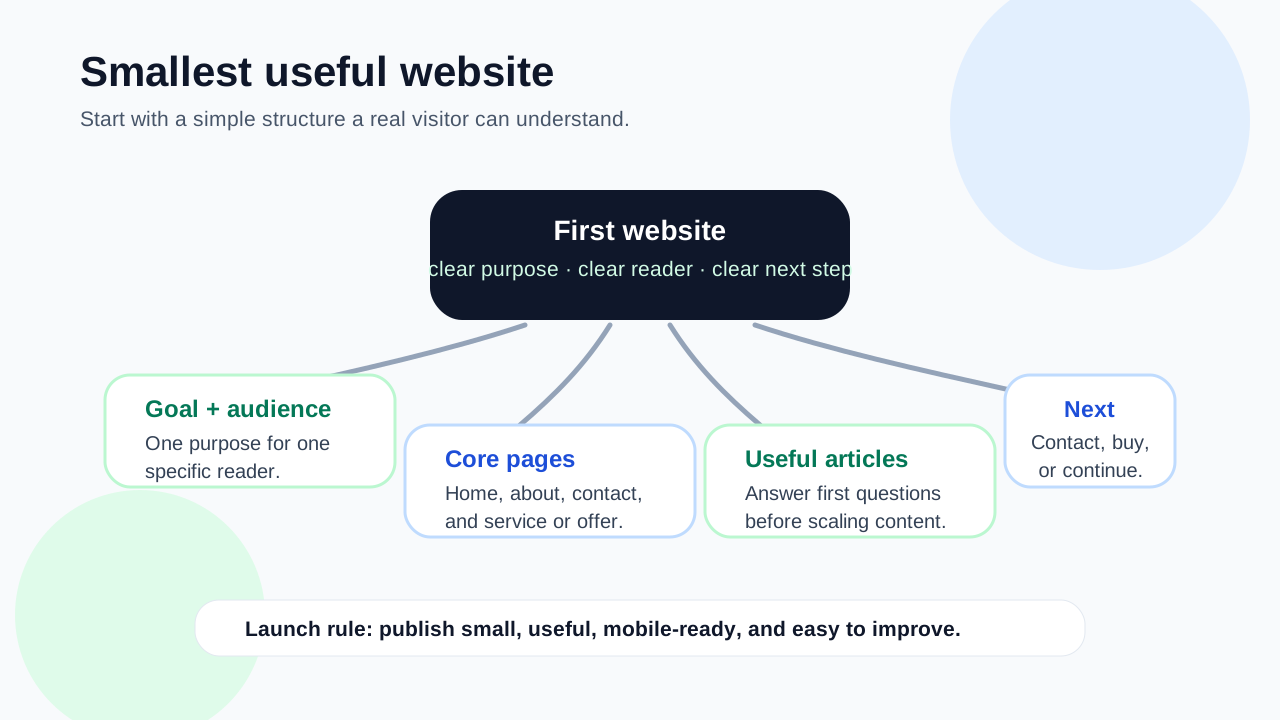
A beginner website should answer three questions clearly: who it helps, what problem it solves, and what the visitor should do next.
Start with one website goal
Before choosing a platform, decide what the website is for.
Common beginner goals include:
- explaining a service;
- publishing helpful articles;
- building an affiliate content site;
- collecting leads;
- selling a simple digital product;
- creating a local business presence;
- testing a niche idea.
A website built for every possible goal usually becomes confusing. Pick one primary goal first.
Google’s helpful content guidance is a useful standard here: the page should help people accomplish a task, not exist only to attract clicks.
Step 1: Choose a narrow audience
A beginner website becomes easier to build when the audience is specific.
Instead of:
- everyone who wants to make money online;
- all small businesses;
- anyone interested in fitness;
- people who need a website.
Use a narrower angle:
- beginner freelancers who need a simple service site;
- local cleaners who need quote requests;
- new bloggers choosing WordPress hosting;
- creators selling templates;
- affiliate beginners reviewing one product category.
A narrow audience helps you choose pages, wording, examples, and calls to action. If you are still comparing possible directions, review niche ideas before committing to the first site structure.
Step 2: Plan the first site structure
Do not start with 30 pages. Build the minimum useful structure.
A simple beginner website can start with:
- Homepage.
- About page.
- Contact or next-step page.
- One main topic or service page.
- Three helpful articles.
- Privacy policy.
- Optional disclosure page if you use affiliate links.
WordPress’s beginner documentation also starts with staged setup: get the basics working before adding complexity. That mindset is useful no matter which builder you choose.
Step 3: Pick a platform that matches your needs
The best platform depends on the website type.
| Website need | Common fit |
|---|---|
| Long-form content and SEO | WordPress or static site generator |
| Fast simple presence | Hosted website builder |
| Technical control | Static site generator |
| Product sales | Ecommerce platform |
| Service lead generation | WordPress, hosted builder, or custom landing site |
Beginners often overvalue visual templates and undervalue content control. A beautiful homepage does not help if you cannot publish organized pages, edit titles, add internal links, or update content easily.
Step 4: Choose a domain carefully
A domain should be simple, readable, and flexible enough for the topic.
Good domain habits:
- keep it easy to spell;
- avoid confusing hyphens if possible;
- avoid names that limit future content too much;
- avoid trademark problems;
- choose something people can say out loud;
- make sure it fits the audience.
The domain does not need to be perfect. A useful site with a good enough name is better than weeks spent searching for the perfect domain.
Step 5: Set up hosting or a hosted builder
If you use WordPress, you usually need hosting. If you use a hosted builder, hosting is included.
For beginners, the key is not buying the most expensive plan. The key is understanding what you need now:
- enough performance for a small site;
- simple setup;
- SSL support;
- backups or recovery options;
- support you can understand;
- room to grow if the site works.
A small beginner site rarely needs advanced infrastructure on day one.
Step 6: Create the core pages first
Your first pages should build trust and explain the site.
Homepage
The homepage should explain:
- who the site helps;
- what the visitor can find;
- the main topic or offer;
- the next best page to visit.
About page
The about page should explain why the site exists and what kind of help it provides. It does not need to be long, but it should not feel anonymous.
Contact or next-step page
If the site supports services, leads, or feedback, create a clear contact path. If you are not ready for contact forms, do not show a fake form.
First helpful articles
Start with useful beginner questions. These pages can attract search traffic later and give visitors a reason to trust the site.
Step 7: Use basic SEO from the beginning
You do not need advanced SEO tools to launch a beginner website. You do need clean basics.
Google’s SEO Starter Guide emphasizes making pages understandable for users and search engines.
Use these habits:
- one main topic per page;
- clear titles;
- useful descriptions;
- readable URLs;
- headings that describe the page;
- internal links between related pages;
- helpful original explanations;
- mobile-friendly pages;
- no keyword stuffing.
SEO is easier when the site structure is simple.
Step 8: Write pages for decisions, not just keywords
A beginner website should not be a pile of keyword pages.
Each page should help with a real decision:
- Should I use WordPress or a builder?
- What should my first service page include?
- Which niche should I test?
- What hosting plan is enough?
- What should I publish first?
This makes content more useful and creates natural internal links.
Step 9: Add trust signals
Trust matters even on a small site.
Useful trust signals include:
- clear authorship or site purpose;
- realistic claims;
- privacy policy;
- affiliate disclosure when relevant;
- contact or support path;
- updated content;
- honest limitations;
- no fake income claims.
A beginner site does not need to look like a corporation, but it should feel accountable.
Step 10: Launch the smallest useful version
Do not wait until everything is perfect.
A launch-ready beginner site can be simple:
- homepage;
- about page;
- privacy policy;
- one main category or service page;
- three helpful articles;
- clear navigation;
- working mobile layout;
- one next step.
After launch, improve based on what visitors read, search engines discover, and readers ask.
Common beginner mistakes
Avoid these mistakes when creating your first website:
- choosing a platform before knowing the site goal;
- buying too many tools before publishing content;
- designing every page before testing the idea;
- copying generic content from competitors;
- using unclear navigation;
- hiding the main next step;
- expecting traffic immediately;
- adding affiliate links before building trust;
- ignoring mobile readability.
A beginner website should be small, useful, and easy to improve.
A practical beginner website checklist
Before publishing, check:
| Item | Why it matters |
|---|---|
| Clear audience | The site knows who it helps. |
| Simple structure | Visitors can understand where to go. |
| Useful first pages | The site has substance beyond a homepage. |
| SEO basics | Pages can be discovered and understood. |
| Trust pages | Visitors can see the site is legitimate. |
| One next step | The site has a clear purpose. |
| Update path | You can improve pages after launch. |
Final recommendation
To create a website for beginners, start with the smallest useful version: one audience, one goal, a simple structure, a few helpful pages, and one clear next step.
Do not overbuild before the site proves its value. Publish, learn, improve, and then add more pages, tools, monetization paths, or services when the direction is clear.
If you are choosing a website type, read Make Money Online Website Types. If you are comparing monetization paths, continue with How to Make Revenue from Website.
FAQ
What is the easiest way to create a website for beginners?
The easiest way is to choose one goal, use a simple builder or WordPress setup, publish a homepage, about page, privacy page, and a few useful articles before adding advanced features.
Do beginners need WordPress?
No. WordPress is flexible for content and SEO, but hosted builders can work for simple sites. Choose based on your content plan, technical comfort, and growth needs.
How many pages should a beginner website have?
Start with five to eight useful pages: homepage, about, privacy, contact or next-step page, one main topic page, and a few helpful articles.
Should I monetize my website immediately?
Only if the monetization path fits the visitor. Many beginner sites should first build useful pages, trust, and basic traffic before adding ads, affiliate links, or products.
What should I avoid when creating my first website?
Avoid overbuilding, buying unnecessary tools, copying thin content, hiding the next step, ignoring mobile users, and expecting instant traffic or income.