How to Build a Website for Small Business Step by Step
-
 OppMint Team
 - 06 Jun, 2026
Learning how to build a website for small business starts with a practical goal: help the right customer understand the business and take the next step.
A small business website does not need to be large at launch. It needs clear positioning, useful pages, trust signals, mobile readability, and a simple path to contact, book, buy, or request a quote.
Define the job of the website
Before choosing a design, decide what the website should do.
A small business website may need to:
- explain services;
- support local discovery;
- collect quote requests;
- show proof and examples;
- answer common questions;
- help customers compare options;
- support referrals;
- publish useful content;
- convert visitors into leads.
Pick one primary job first. A website that tries to do everything often does nothing clearly.
Step 1: Clarify your offer
Your website should make the offer simple to understand.
Write down:
- who the business serves;
- what problem the customer has;
- what service or product solves it;
- where you serve customers, if location matters;
- what makes your approach different;
- what action the visitor should take.
This becomes the foundation for homepage copy, service pages, SEO titles, and calls to action.
Step 2: Choose the platform
Small businesses usually choose between a hosted website builder, WordPress, or a custom/static setup.
| Option | Best fit |
|---|---|
| Hosted builder | Fast setup, simple editing, low maintenance |
| WordPress | Content growth, SEO flexibility, long-term control |
| Static/custom site | Technical owners who want speed and control |
| Ecommerce platform | Product catalog, checkout, inventory, payments |
WordPress’s beginner documentation shows that setup should happen in stages. That is useful for small businesses: launch the important pages first, then add advanced features after the site has a real purpose.
Step 3: Register a domain and prepare hosting
Choose a domain that is easy to remember and close to the business name or service.
If using WordPress, choose hosting that supports:
- SSL;
- backups;
- updates;
- reasonable speed;
- beginner-friendly support;
- room to grow.
If using a hosted builder, hosting is included, but check whether you can use a custom domain, edit SEO fields, and publish enough content pages.
Step 4: Build the essential page set
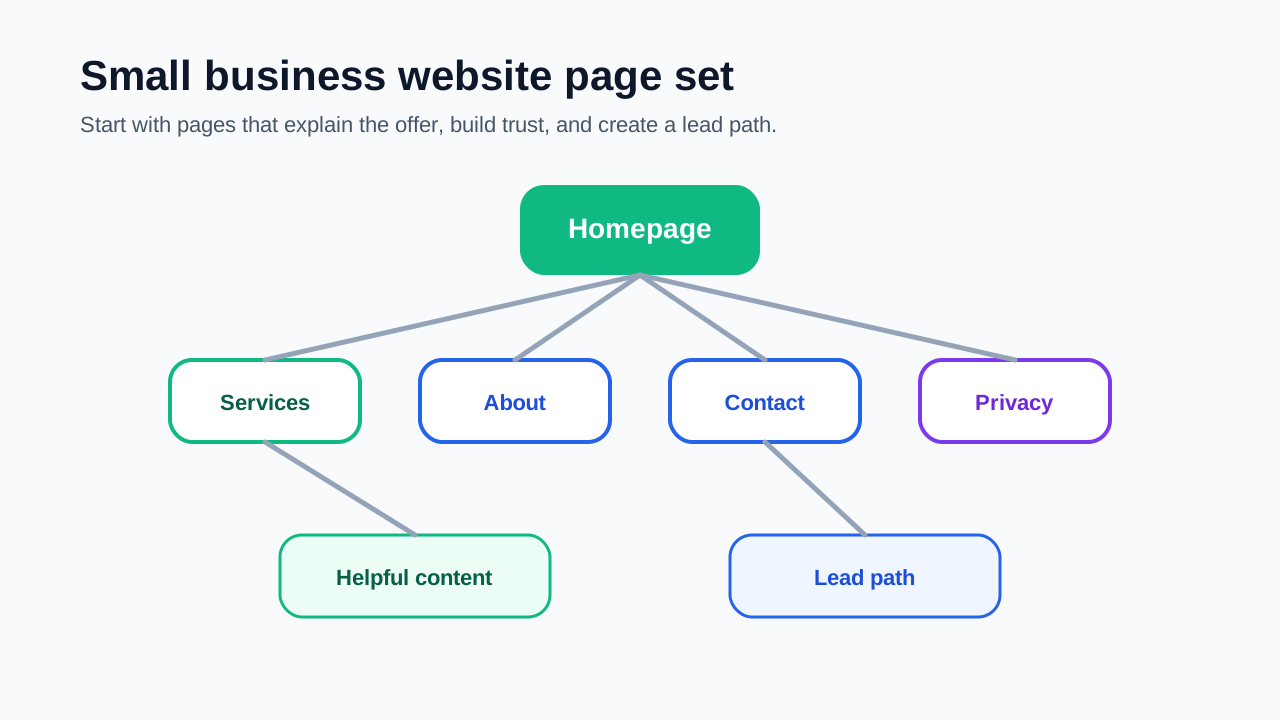
A small business website can start with a focused page set.
Homepage
The homepage should make the business clear quickly.
Include:
- what you do;
- who you help;
- main services or products;
- service area if relevant;
- trust signals;
- a clear next step.
Services page
The services page should explain each offer in practical language.
For each service, show:
- who it is for;
- what is included;
- common use cases;
- what the process looks like;
- when someone should contact you.
About page
The about page should make the business feel real. Explain the mission, working style, experience, and who the business is best suited for.
Contact page
The contact page should reduce uncertainty. Tell visitors what information to send and what happens after they reach out.
Privacy policy
If you collect form submissions, analytics, emails, or other visitor information, explain how that information is handled.
Step 5: Add SEO basics while building
Do not wait until after launch to think about SEO.
Google’s SEO Starter Guide emphasizes clear pages that users and search engines can understand. For small business websites, that means:
- clear page titles;
- descriptive meta descriptions;
- one main topic per page;
- useful headings;
- readable URLs;
- internal links between related pages;
- helpful service descriptions;
- mobile-friendly layout;
- no copied or thin content.
Google’s guide for getting on Google also reinforces a basic point: pages must be accessible and understandable before search visibility can grow.
Step 6: Write for customer questions
Small business content should come from real customer questions.
Useful article types include:
- cost explainers;
- service comparison pages;
- preparation checklists;
- mistake guides;
- process explainers;
- maintenance tips;
- local resource pages;
- FAQs for common objections.
For example, a website setup service could publish articles about domain choices, hosting basics, WordPress setup, and what a service page should include.
Step 7: Create a clear lead path
A small business website should guide visitors to the next step.
Common calls to action:
- request a quote;
- book a consultation;
- call the business;
- send project details;
- view services;
- download a checklist;
- join an email list;
- compare packages.
Use one primary call to action on important pages. Too many choices can reduce action.
Step 8: Build trust before asking for action
Trust signals help visitors feel safer contacting a business.
Add what you have honestly:
- clear business identity;
- service area;
- examples or case studies;
- testimonials if real;
- process explanation;
- realistic limitations;
- privacy policy;
- clear contact expectations;
- updated pages.
Do not invent proof. It is better to explain your process clearly than to fake authority.
Step 9: Make the website mobile-friendly
Many small business visitors use phones. The site should work well on mobile.
Check:
- text is readable;
- buttons are easy to tap;
- contact options are visible;
- forms are short;
- pages do not require horizontal scrolling;
- images load reasonably;
- navigation is simple;
- important information appears early.
A mobile visitor should be able to understand the business and take action without frustration.
Step 10: Launch, then improve
A small business website should not stay unpublished for months because minor details are unfinished.
Launch when you have:
- clear homepage;
- services page;
- about page;
- contact path;
- privacy policy;
- basic SEO fields;
- mobile-readable layout;
- a few helpful support pages.
After launch, improve based on search impressions, inquiries, customer questions, and page engagement.
Small business website checklist
Use this checklist before publishing.
| Area | Check |
|---|---|
| Offer | The site explains what the business does. |
| Audience | The visitor can tell if the service fits them. |
| Pages | Homepage, services, about, contact, and privacy exist. |
| SEO | Titles, descriptions, headings, and URLs are clear. |
| Trust | The business feels real and accountable. |
| Lead path | The next step is obvious. |
| Mobile | The site works on a phone. |
| Content | Helpful pages answer real customer questions. |
Common mistakes to avoid
Avoid these small business website mistakes:
- using vague homepage copy;
- hiding the service offer;
- making the contact path hard to find;
- copying competitor text;
- creating too many thin pages;
- ignoring mobile visitors;
- using stock claims without proof;
- starting a blog with no strategy;
- buying tools before the site has a clear offer.
A good small business website is not complicated. It is clear, useful, and easy to act on.
Final recommendation
To build a website for small business, start with the offer and customer journey. Build a focused page set, add basic SEO, create trust signals, and make the next step obvious.
You can add blog content, automation, lead magnets, booking tools, or ecommerce later. The first version should help real visitors understand the business and contact you with confidence.
If you need the setup checklist, read Business Website Setup. If you are still choosing the first platform, start with How to Create a Website for Beginners.
FAQ
How much does it take to build a small business website?
The cost depends on the platform, hosting, design, content, and whether you hire help. A simple site can start small, but you should also account for maintenance, updates, and content.
Can I build a small business website myself?
Yes, if the site is simple and you can write clear content. If you need custom design, complex booking, ecommerce, or SEO strategy, professional help may save time.
What should a small business website include?
It should include a homepage, services page, about page, contact path, privacy policy, clear calls to action, trust signals, and helpful content that supports customer decisions.
Is WordPress good for small business websites?
WordPress can be a strong choice for small businesses that want content, SEO flexibility, and long-term control. Hosted builders can be easier for simpler sites.
How do small business websites get traffic?
Traffic can come from search, local discovery, referrals, social profiles, email, direct visits, and useful content. SEO basics and clear service pages help search engines understand the site.