WordPress vs Static Site for Affiliate Sites: 3-Year Total Cost
-
 OppMint Team
 - 14 Jun, 2026
Static site vs WordPress for affiliate websites covered the architecture comparison — speed, SEO, what each is good at. This article picks up where that left off and answers a different question: over 3 years of running an affiliate review website, how much cash does each platform actually cost?
Most “WordPress vs static” articles online compare hosting fees ($5/mo vs $0) and stop there. They miss plugins, security tooling, migration costs. But other articles wildly overinflate by pricing the founder’s time at agency rates. This article does only the cash math — what you actually wire-transfer over 3 years.
What “total cost” includes (cash only)
This article only counts real cash you’ll pay. We’re not pricing your own time at $50/hr — that’s a useful exercise but tends to inflate numbers in ways most indie operators don’t actually feel. If you want to factor in your time, multiply hours from each section by your hourly rate.
Cash categories on the table:
- Hosting and CDN
- Domain (same on both, ~$10-15/yr)
- Theme / template
- Plugins / build-time tools
- Backup and security tooling
- Headless CMS (static only, optional)
This article models all categories for both platforms across 3 typical site sizes.
The 3 site sizes I’m comparing
To make the math useful, I’ll model three realistic affiliate site sizes:
| Tier | Pages | Monthly visits | Monthly affiliate revenue | Editor count |
|---|---|---|---|---|
| Small | 50-200 | < 10k | $100-500 | 1 (you) |
| Medium | 500-1500 | 30-100k | $1k-5k | 2-3 |
| Large | 3000+ | 200k+ | $10k+ | 5+ |
Numbers are realistic ranges, not best-case. Adjust to your situation.
WordPress 3-year cash breakdown
Hosting + CDN
For affiliate sites at indie scale, you don’t need managed WordPress hosting (Kinsta/WP Engine) until you have real traffic. Realistic tiers:
- Small site (<10k/mo visits): shared hosting (Hostinger, Namecheap, A2) at $3-5/mo → 3yr: $108-180
- Medium (30-100k/mo): VPS (Hetzner CX22 ~$5/mo, DigitalOcean $6-12/mo) or Cloudways DO $14/mo → 3yr: $180-500
- Large (200k+/mo): dedicated VPS $20-40/mo or managed tier $30-50/mo → 3yr: $700-1,800
Cloudflare free tier handles CDN at every size.
Plugins (what you actually need to pay for)
Most affiliate-site plugin lists you see online over-prescribe paid plugins. Truth at indie scale:
- SEO: Rank Math (free) is enough; Pro at $59/yr is optional
- Schema / markup: included in Rank Math free
- Affiliate links: Pretty Links free version handles cloaking; ThirstyAffiliates Pro is overkill for < 50 affiliate links
- Image optimizer: Smush free or build-side compression
- Caching: WP Super Cache (free) or LiteSpeed Cache (free); WP Rocket $59 only if you want one-click setup
- Backup: UpdraftPlus free or BlogVault $89/yr only at scale
- Security: Wordfence free plus 2FA is enough at small scale
3-year realistic plugin cash:
- Small site: $0-200 (mostly free tier)
- Medium: $100-400 (1-2 paid plugins)
- Large: $300-700 (Rank Math Pro + WP Rocket + maybe BlogVault)
Theme
- One-time: $0-60 (Astra Pro $59 lifetime, GeneratePress free, Kadence free, etc.)
3-year cost: $0-60
Domain
$10-15/yr × 3 = $30-45 (same for both platforms)
Security tooling beyond plugins
- Cloudflare: free for most cases; Cloudflare Pro is $20/mo only for high-traffic sites
- Small/Medium: $0 (Cloudflare free + plugin baseline is enough)
- Large: $0-720 (might add Cloudflare Pro or Sucuri at scale)
WordPress 3-year cash totals
| Tier | Hosting | Plugins | Theme | Domain | Security | Total |
|---|---|---|---|---|---|---|
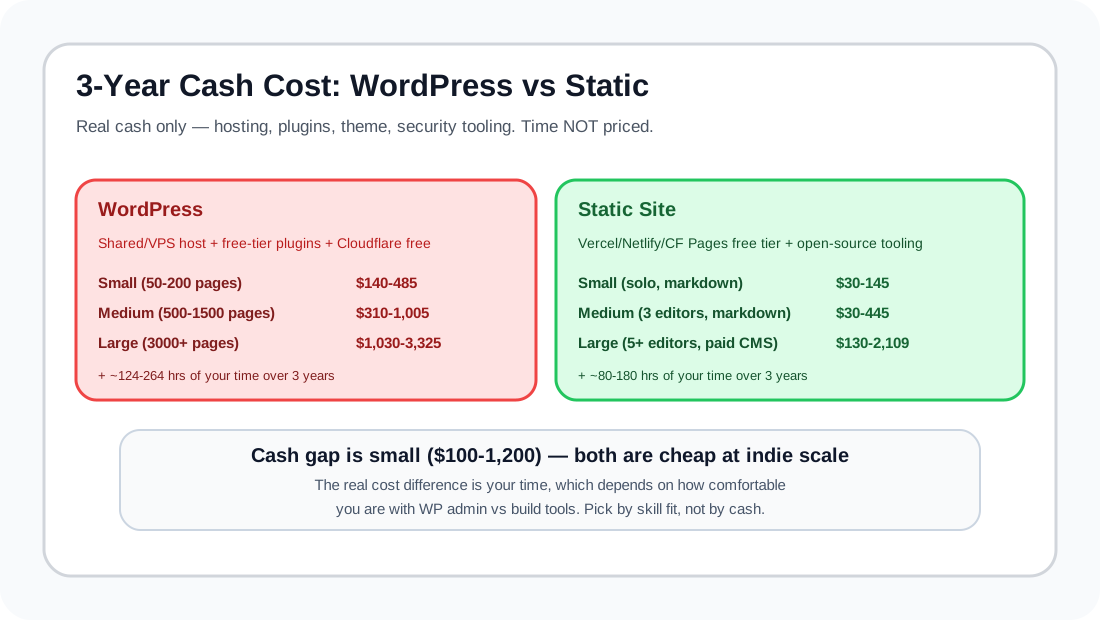
| Small | $108-180 | $0-200 | $0-60 | $30-45 | $0 | $140-485 |
| Medium | $180-500 | $100-400 | $0-60 | $30-45 | $0 | $310-1,005 |
| Large | $700-1,800 | $300-700 | $0-60 | $30-45 | $0-720 | $1,030-3,325 |
Static site 3-year cash breakdown
Astro / Next.js / Hugo / 11ty etc on Vercel / Netlify / Cloudflare Pages.
Hosting + CDN
- Small/Medium (up to ~100k/mo): Free on Vercel / Netlify / Cloudflare Pages within free tiers
- Large (200k+/mo): Vercel Pro $20/mo or Cloudflare Pages still free for static + Workers cheap → 3yr: $0-720
This is the headline gap with WordPress.
”Plugins” / build-time tools
Static replaces plugins with free code or build-time tools:
- SEO / schema: built into framework or 1 line of meta tag — free
- Affiliate link tracking: open-source library — free
- Image optimization: built-in (Astro, Next/Image) — free; Cloudinary $0-89/yr only if you need it
- Caching: not needed (static = always cached) — free
- Backup: git — free
- Email integration: ConvertKit / Mailchimp same cost as WordPress
3-year tooling: $0-300 (mostly $0; Cloudinary/Plausible analytics if you choose)
Theme / template
- Free framework templates everywhere → $0
Domain
Same as WordPress: $30-45
Headless CMS (only if you need non-developer editors)
If you’re solo and write in markdown — $0.
If you have 2+ non-developer editors:
- Decap CMS (free, self-hosted): $0
- Tina ($29/mo paid): up to $1,044 over 3 years
- Sanity team plan ($99/mo): up to $3,600 over 3 years
Static site 3-year cash totals
| Tier | Hosting | Tools | Domain | CMS | Total |
|---|---|---|---|---|---|
| Small (solo) | $0 | $0-100 | $30-45 | $0 | $30-145 |
| Medium (3 editors, markdown) | $0 | $0-200 | $30-45 | $0-200 | $30-445 |
| Large (5+ editors, 200k+ visits) | $0-720 | $100-300 | $30-45 | $0-1,044 | $130-2,109 |
Side-by-side 3-year cash cost
| Site tier | WordPress | Static | Static saves |
|---|---|---|---|
| Small | $140-485 | $30-145 | ~$100-340 |
| Medium | $310-1,005 | $30-445 | ~$280-560 |
| Large | $1,030-3,325 | $130-2,109 | ~$900-1,200 |
Static wins on cash at every site size — but the gap is much smaller than internet “WordPress is expensive” arguments suggest. Both are cheap at indie scale. The real cost difference is time, which we deliberately didn’t price here.
What cash doesn’t capture — your time
Cash difference is small ($100-1,200 over 3 years). The real cost difference between platforms is time, which we deliberately didn’t price. Rough hour estimates:
- WordPress: 124-264 hours over 3 years (plugin updates, theme upgrades, security incidents, performance debugging)
- Static: 80-180 hours over 3 years, but front-loaded — most in year 1 for setup
If you bill your time at $50/hr the time gap can be $2,000-4,000 over 3 years — much bigger than the cash gap. If your time has $0 opportunity cost (you’d be browsing Twitter instead), the cash table above is the whole picture.
Where WordPress is the right choice anyway
Even though static is cheaper on cash, WordPress wins when:
- Non-technical editors must publish independently — paid headless CMS (Tina/Sanity) pushes static cost up; WordPress’s editor experience is just better for non-coders
- Site relies heavily on user-generated content / forums / e-commerce — WordPress + WooCommerce / BBpress is mature; static equivalents need much more dev work
- Migration from existing WP site is too expensive — sometimes the cheapest move is staying on WP
- You ship 5+ specialized affiliate features yearly — each one as static code is more work than installing a plugin
- You’re comfortable with PHP + admin UI but not with build tools / CI
Where static decisively wins
- Solo founder writing in markdown — static is free everywhere
- High traffic spikes — static has zero hosting cost variance under spike, WordPress hosting tiers up sharply
- Affiliate sites that need to be fast — Core Web Vitals correlate with rankings; static wins by default
- Long-term security peace of mind — no DB, no exec, no plugins = nothing to hack
Migration considerations
If you’re already on one and considering switching, factor migration cost:
- WP → Static: 40-100 hours work depending on plugin reliance and content volume
- Static → WP: 20-60 hours (easier; WP is more flexible re: data import)
Migration cost is often equal to 6-12 months of TCO savings. Don’t migrate just because the math looks cleaner — only when migration savings clearly exceed migration cost over remaining 18-24 months.
Decision rule
Pick WordPress if:
- You ship affiliate sites where non-technical editors must publish independently AND
- You’re not skilled with build tools / framework code AND
- Your sites grow slowly (no big traffic spikes)
Pick static if:
- You’re solo or mostly solo AND
- You write in markdown comfortably OR can set up Tina/Decap AND
- Speed and Core Web Vitals matter for your SEO
For static-tooling specifics see static website maintenance checklist and small website automation workflows.
Further reading:
- The architecture comparison without cost: static site vs WordPress for affiliate websites
- Hosting deep-dive: best web hosting for blog and Cloudflare WordPress hosting
- If you go WordPress: best WordPress hosting Reddit
- If you go static: Indie developer website stack covers full developer tooling