Static Website Maintenance Checklist for Small Income Sites
-
 OppMint Team
 - 13 Jun, 2026
A static website needs less maintenance than a dynamic site, but it still needs regular attention. This checklist covers the essential tasks for keeping a small income site stable, secure, and visible in search.
Why Static Sites Still Need Maintenance
Static sites do not have databases, server-side software, or login systems. That eliminates many security and performance risks. But they still depend on:
- domain and DNS configuration
- hosting provider reliability
- CDN and SSL certificate validity
- content freshness and accuracy
- internal and external link health
A quarterly maintenance routine catches small issues before they become traffic problems.
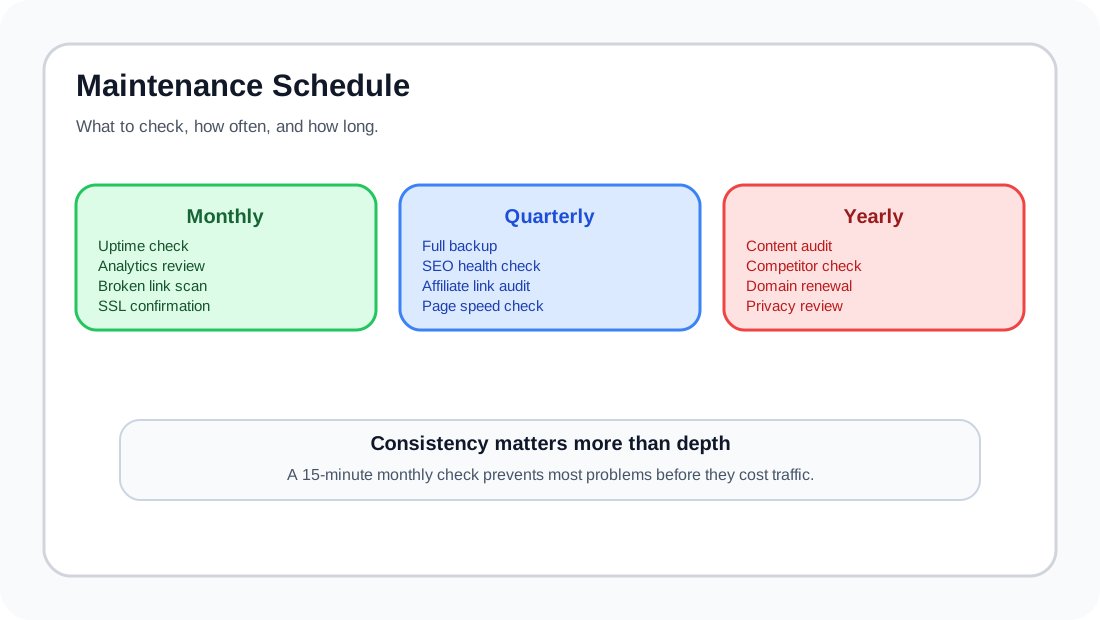
Monthly Tasks (15 Minutes)
These tasks can be done in a single session each month.
- Check uptime: log into UptimeRobot or your monitoring tool; confirm no recent downtime.
- Review analytics: check traffic trend, top pages, bounce rate, and search query changes.
- Scan for broken links: run a link checker on your domain; fix any broken internal or external links.
- Verify forms and contact pages: submit a test message to confirm delivery.
- Confirm SSL certificate is active: visit your site over HTTPS; check expiration date.
Quarterly Tasks (1 Hour)
Every three months, do a deeper review.
- Full backup: export or copy all source files and assets to an off-site location.
- SEO health check: review page titles, meta descriptions, and heading structure for the top 20 pages.
- Update static dependencies: if your site uses a framework or theme, check for security updates.
- Review affiliate links: click through each affiliate link; confirm it still works and reaches the correct page.
- Check page speed: run a Core Web Vitals check; address any regressions.
For detailed SEO checks, see the on-page SEO checklist and complete SEO audit guide.
Annual Tasks (2-3 Hours)
Once per year, do a comprehensive review.
- Content audit: review every page. Update outdated statistics, prices, screenshots, and examples.
- Competitor review: check whether newer competitors offer better content or more current information.
- Domain renewal: verify domain expiration date; renew if needed (set auto-renew if possible).
- Analytics goals: review conversion tracking; confirm you can still measure what matters.
- Privacy and terms review: confirm privacy policy, affiliate disclosure, and terms pages match current practice.
Common Issues Found During Maintenance
| Issue | Where it appears | How to fix |
|---|---|---|
| Broken external link | External resource links | Use a link checker quarterly |
| Slow page | Large images or unused CSS | Run Lighthouse, optimize assets |
| Stale content | Old articles with outdated info | Update or archive |
| Missing SSL | Expired certificate | Auto-renew with hosting provider |
| DNS propagation | Changed hosting, DNS still pointing old | Check with dig/whois |
Automation That Reduces Manual Work
You can automate several maintenance tasks:
- Uptime monitoring: UptimeRobot sends email alerts automatically
- Backup scheduling: most static hosting providers offer automatic backups
- Link checking: run a monthly script or use a service like Dr. Link Check
- SSL renewal: Cloudflare and most hosts handle this automatically
See the small website automation guide for tool recommendations and workflow setup.
Maintenance Budget for Small Sites
| Task | Frequency | Time | Cost (if outsourced) |
|---|---|---|---|
| Uptime monitoring | Continuous | Automated | Free |
| Link checking | Monthly | 5 min | Free |
| SEO audit | Quarterly | 30 min | Free to $20 |
| Content refresh | Annual | 2-3 hours | Self or freelance |
| Backup verification | Monthly | 5 min | Free |
| Security scan | Quarterly | 10 min | Free |
Most small income sites can be maintained for under $50/year and 10-15 hours of your time.
FAQ
Do static sites need security updates?
They need fewer than dynamic sites. If you use a static site generator, update it occasionally. If you use pre-built themes, check for known vulnerabilities.
What happens if I skip maintenance?
Traffic can decline from broken links and stale content. Security risks are lower than dynamic sites, but DNS, SSL, and hosting issues can still cause downtime.
How do I know my backup is working?
Test it. Restore the backup to a staging environment or local machine at least once per year. A backup you have not tested is not a backup.