Internal Linking Best Practices for Small Websites
-
 OppMint Team
 - 06 Jun, 2026
Internal linking best practices help visitors and search engines understand how your pages connect. For a small website, good internal links can make useful content easier to find, crawl, and improve.
Internal links are not just an SEO detail. They are part of the website experience. A visitor who reads one helpful page should have a clear next step.
What internal links do
Internal links connect one page on your website to another page on the same website.
They help with:
- navigation;
- discovery;
- crawlability;
- topic relationships;
- page hierarchy;
- user journeys;
- conversion paths;
- content maintenance.
A site with no internal linking plan often becomes a collection of isolated pages.
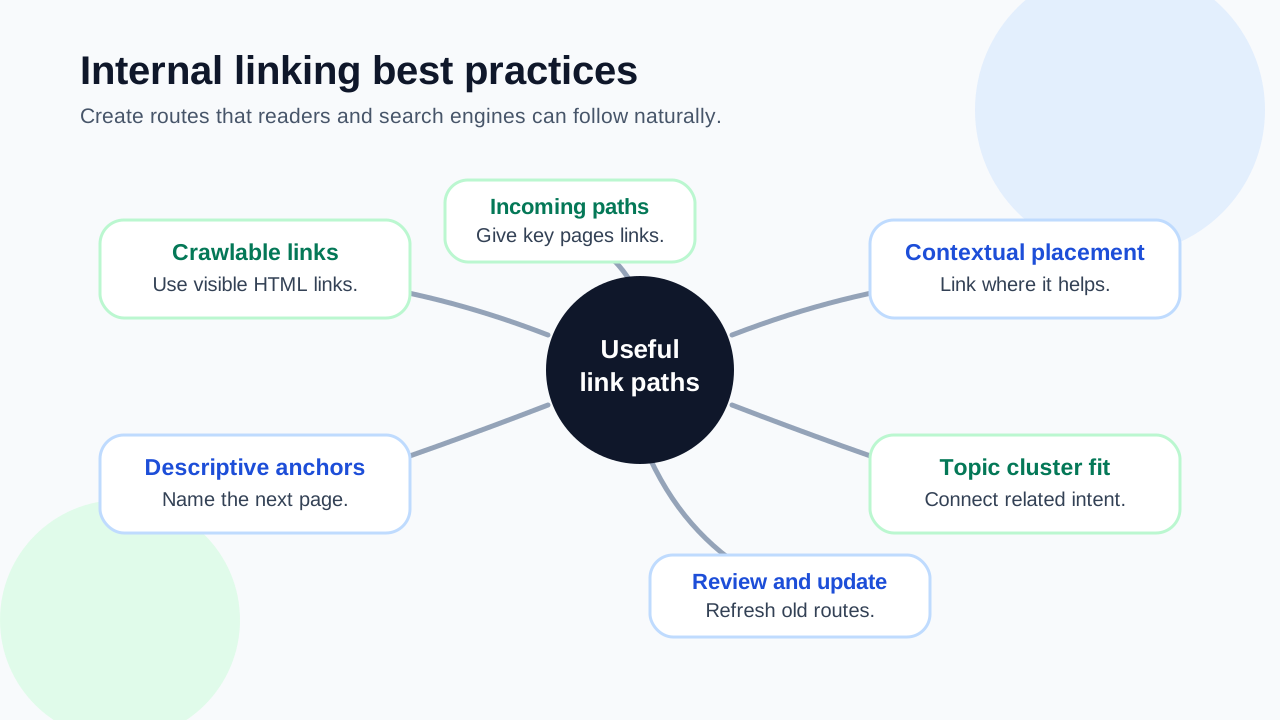
Use crawlable links
Search engines need to be able to discover links in a normal way.
Use links that:
- point to real URLs;
- are visible in the page content or navigation;
- use descriptive anchor text;
- do not rely only on scripts or hidden interactions;
- lead to pages that return a successful response.
If an important page is not linked from anywhere, it may be harder for both users and search engines to find.
Link from context, not only menus
Menus and category pages are useful, but contextual links inside the article often help more.
For example:
- a hosting article can link to a beginner website guide;
- a content strategy article can link to an SEO checklist;
- a monetization article can link to an affiliate website guide;
- a tools article can link to a practical audit page.
The link should make sense in the sentence around it.
Use descriptive anchor text
Anchor text should tell readers what they will get after clicking.
Better anchors:
- beginner website guide;
- on-page SEO checklist;
- affiliate website setup;
- content strategy tools;
- website SEO audit.
Weaker anchors:
- click here;
- read more;
- this page;
- learn more with no context.
Descriptive anchors improve clarity without forcing keyword stuffing.
Connect related pages into clusters
Small sites should group related pages instead of leaving them scattered.
A simple cluster may include:
| Cluster role | Example |
|---|---|
| Main guide | How to build a website |
| Supporting article | Best web hosting for beginners |
| Checklist | New site SEO checklist |
| Tool page | Website SEO audit |
| Monetization page | How to make revenue from a website |
Each supporting page should link naturally to the main guide when it helps the reader.
Avoid orphan pages
An orphan page is a page that has no internal links pointing to it.
Orphan pages are risky because:
- visitors may never find them;
- search engines may discover them slowly;
- the page may not fit into the site’s topic structure;
- updates may be forgotten.
When publishing a new article, link to it from at least one relevant existing page or category path.
Link both up and sideways
Internal links should not only point upward to a main page. They should also connect related supporting pages.
Use:
- upward links to main guides or categories;
- sideways links to related articles;
- downward links from main guides to detailed pages;
- next-step links to services, tools, or checklists.
This creates a useful path instead of a one-way hierarchy.
Keep link count reasonable
More links are not always better.
A page with too many internal links can feel cluttered and unfocused. Add links where they help the reader:
- understand a term;
- compare options;
- take the next step;
- find a related checklist;
- continue a learning path.
If a link does not help the reader, it probably does not belong.
Check important pages regularly
Internal linking is not a one-time task.
Review important pages when:
- new articles are published;
- categories change;
- old pages lose traffic;
- services change;
- broken links appear;
- a page becomes more important to the business.
Old content often needs new internal links as the site grows. If you need to find gaps faster, an internal linking tool can help identify orphan pages, weak anchors, and broken paths before manual review.
Internal linking checklist
Before publishing or updating a page, ask:
| Question | Why it matters |
|---|---|
| Does this page link to a relevant next step? | Helps visitors continue |
| Does another page link back to this page? | Avoids orphan content |
| Is anchor text descriptive? | Improves clarity |
| Are links crawlable? | Helps discovery |
| Are links relevant to the section? | Avoids clutter |
| Does the page support a topic cluster? | Builds structure |
| Are old links still accurate? | Prevents bad user paths |
This checklist is enough for most small websites.
Common mistakes
Avoid these internal linking mistakes:
- publishing pages with no incoming links;
- linking only from the menu;
- using vague anchor text;
- adding too many links in every paragraph;
- forcing exact-match anchors unnaturally;
- linking to unrelated monetization pages;
- ignoring broken or redirected links;
- never updating old articles with links to new content.
Internal links should feel useful, not mechanical.
Final recommendation
The best internal linking practice is to create clear, crawlable, relevant paths between related pages. Link from context, use descriptive anchors, avoid orphan pages, and connect articles into topic clusters that support the visitor journey.
If you are planning the structure of a site, read Blog Content Strategy. If you want a broader growth path, read How to Increase Organic Traffic on Website.
FAQ
What are internal linking best practices?
Use crawlable links, descriptive anchor text, relevant context, topic clusters, links from old to new content, and regular checks for orphan or broken pages.
How many internal links should a page have?
There is no fixed number. Add enough links to help readers continue, but avoid cluttering the page with unrelated links.
Do internal links help SEO?
They can help search engines discover pages, understand relationships, and crawl the site more effectively. They also improve user navigation.
What is an orphan page?
An orphan page is a page with no internal links pointing to it. It may be difficult for users and search engines to find.
Should anchor text include keywords?
Anchor text should be descriptive and natural. It can include relevant terms, but it should not be forced or repeated unnaturally.