Service Website Follow-Up Sequence: Turn Form Fills Into Qualified Conversations
-
 OppMint Team
 - 27 Jun, 2026
A service website follow-up sequence should not feel like a sales script. Its job is simpler: deliver the promised resource, help the visitor understand their problem, and invite a conversation only when the next step makes sense.
This matters because many service websites do the hard part once, then stop. They publish a lead magnet, collect an email address, and immediately send either nothing or a hard sales pitch. Both waste the visitor’s attention.
Why follow-up matters after a lead magnet
A lead magnet creates a small commitment. It does not automatically create a ready-to-buy lead.
The visitor may be in one of three stages:
| Stage | What they need | Bad follow-up |
|---|---|---|
| Learning | Understand the problem | “Book a call now” |
| Comparing | Decide between options | Generic newsletter blast |
| Ready | Confirm fit and next step | No reply path |
A good sequence moves each person forward without pretending every subscriber is ready for a sales call.
If you are still choosing the resource itself, start with Service Website Lead Magnet Strategy. If the visitor is closer to buying, connect the sequence to your Service Website Pricing Page Guide and contact form.
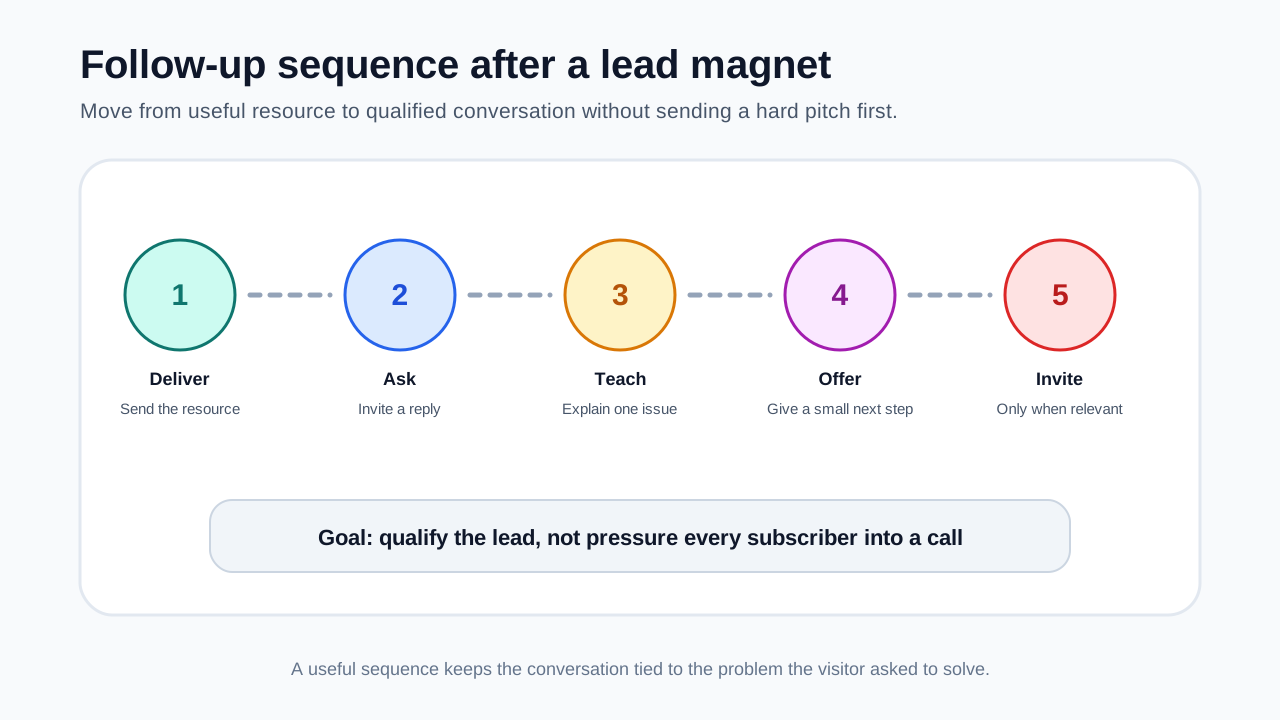
The simple five-email sequence
For most small service websites, five messages are enough.
| Timing | Purpose | Main CTA | |
|---|---|---|---|
| 1. Delivery | Immediately | Send the resource and set expectations | Use the resource |
| 2. Diagnostic | Day 1 | Ask what they discovered | Reply with one finding |
| 3. Education | Day 3 | Explain one common mistake | Read related guide |
| 4. Decision help | Day 5 | Help them choose a next step | Use checklist or pricing page |
| 5. Conversation invite | Day 7-10 | Invite qualified leads to talk | Submit inquiry or book call |
This is not a fixed rule. The key is progression: deliver, diagnose, teach, guide, invite.
Email 1: deliver the resource immediately
The first email should be short. Do not bury the download link under a long pitch.
Structure:
- Thank them for requesting the resource.
- Link the file, checklist, calculator, or worksheet.
- Say what they should do first.
- Explain what kind of follow-up they will receive.
- Offer a simple reply path.
Example:
Subject: Your website readiness checklist

Here is the checklist you requested: [link]

Start with the first section and mark any item you cannot answer clearly. Those gaps usually show where the project needs more planning.

Over the next few days, I’ll send a few short notes on how to interpret the checklist and decide whether you need help.

If one item already looks urgent, reply and tell me which one.
This email builds trust because it does exactly what the visitor asked for.
Email 2: ask one diagnostic question
The second email should invite a reply, not force a call.
Good diagnostic questions:
- Which checklist item was hardest to answer?
- What part of the project feels least clear?
- Are you trying to generate leads, reduce confusion, or improve trust?
- What have you already tried?
Avoid asking for a full business history. The goal is to open a useful conversation.
Example:
Subject: What did the checklist reveal?

When you reviewed the checklist, which section had the most gaps?

Most service websites struggle in one of three places: unclear offer, weak proof, or no next step. If you reply with the section that felt weakest, I can point you toward the most relevant fix.
This works especially well when your Service Website Contact Form Questions are designed to route leads instead of collecting every detail.
Email 3: teach one mistake
The third email should make the subscriber smarter. Pick one mistake that connects to your service.
Examples:
| Service type | Useful teaching angle |
|---|---|
| Website design | Why “pretty” pages still fail to convert |
| SEO consulting | Why traffic without service intent does not create leads |
| Copywriting | Why vague service descriptions reduce inquiries |
| Maintenance | Why small issues become trust problems over time |
| Local marketing | Why service area pages need proof, not just keywords |
Keep this email narrow. One lesson is better than a full guide.
Email 4: help them choose the next step
By the fourth email, the visitor may know the problem but not the path.
Give them a decision framework:
| If this is true | Next step |
|---|---|
| You are still choosing a business direction | Validate the idea first |
| Your website exists but does not convert | Review offer, proof, CTA, and form |
| You get traffic but poor inquiries | Match content to service intent |
| You know the issue but lack time | Consider a paid audit or implementation help |
| You are not ready for a service | Use a self-serve checklist or guide |
You can point them to Website Idea Validation Before Building, Content Website Service Lead Funnel, or Service Website Lead Generation, depending on the problem.
Email 5: invite a qualified conversation
The final email can invite a call or inquiry, but it should be specific.
Weak version:
Want help? Book a call.Better version:
If the checklist showed gaps in your offer, service page, or lead path, I can help you review the website and decide what to fix first.

This is a fit if you already have a service offer and want the website to produce more qualified inquiries.

It is probably not a fit if you are still choosing a niche or looking for guaranteed traffic.
This filters expectations before the form. It also reduces pressure because it says who the offer is not for.
Segment replies without making the system complicated
You do not need a complex CRM to start. Use simple segments:
| Segment | Signal | Follow-up path |
|---|---|---|
| Ready lead | Replies with urgent project and budget context | Personal reply or call invite |
| Researching | Opens/clicks but does not reply | Send related guide |
| Poor fit | Needs something you do not offer | Send self-serve resource |
| No engagement | No opens or clicks | Stop or reduce frequency |
The main rule: do not keep sending sales emails to people who never engaged.
Connect follow-up to the website journey
A follow-up sequence should match the page where the lead came from.
| Entry point | Follow-up emphasis |
|---|---|
| Blog post | Education and problem diagnosis |
| Lead magnet landing page | Resource use and reply prompt |
| Pricing page | Fit, budget, and scope |
| Contact form | Routing and next steps |
| Service page | Proof, process, and consultation fit |
If someone downloaded a checklist from a broad blog post, they may need education. If they submitted a pricing inquiry, they need a faster response and clearer qualification.
Metrics to track
Track whether the sequence creates useful conversations, not just opens.
| Metric | What it tells you |
|---|---|
| Delivery rate | Whether people receive the resource |
| First-click rate | Whether the resource is actually used |
| Reply rate | Whether the diagnostic question works |
| Inquiry rate | Whether the sequence creates qualified intent |
| Bad-fit rate | Whether the promise attracts the wrong audience |
| Unsubscribe rate | Whether the sequence feels too pushy |
If open rates are fine but replies are low, your diagnostic question may be too generic. If replies are high but leads are poor, the lead magnet may attract learners who are not close to buying.
Mistakes to avoid
- Sending a hard pitch immediately after download
- Writing a long newsletter instead of a focused sequence
- Using fake urgency or fake scarcity
- Promising revenue, rankings, or guaranteed leads
- Asking for a call before the visitor understands the problem
- Sending every subscriber the same message forever
- Hiding the next step after someone replies
A good sequence should make the visitor feel helped, not trapped.
Follow-up checklist
Use this before publishing the sequence:
- The first email delivers the promised resource immediately.
- Every email has one purpose.
- The sequence asks at least one useful diagnostic question.
- The call invite explains who is a fit and who is not.
- There is a path for people who are not ready to buy.
- Replies route to a real inbox or CRM.
- The sequence does not promise guaranteed outcomes.
- Metrics include replies and qualified inquiries, not only opens.
Related OppMint guides
- Service Website Lead Magnet Strategy
- Service Website Contact Form Questions
- Service Website Pricing Page Guide
- Service Website Lead Generation
- Content Website Service Lead Funnel
FAQ
How long should a service website follow-up sequence be?
Five emails over seven to ten days is enough for most small service websites. Longer sequences can work, but only if each message helps the visitor make a decision.
Should I invite a call in the first email?
You can include a soft reply option, but the first email should mainly deliver the resource. A call invite usually works better after the visitor understands the problem and fit.
What if someone replies with a bad-fit request?
Reply politely and redirect them to a self-serve resource if possible. Bad-fit replies are useful data; they show whether your lead magnet promise needs to be narrower.
Final take
A service website follow-up sequence should turn attention into clarity. Deliver the resource, ask one useful question, teach one relevant lesson, help the visitor choose a next step, and invite a conversation only when the fit is clear.