Service Website Lead Magnet Strategy: Turn Visitors Into Qualified Leads
-
 OppMint Team
 - 22 Jun, 2026
A service website does not need millions of visitors to work. It needs the right visitors to take the next small step.
That step is often not “book a call.” For a cold visitor, booking a call can feel too early. A better bridge is a lead magnet: a useful checklist, calculator, audit template, worksheet, or short email course that helps the visitor diagnose their problem before they talk to you.
Why service websites need a lead magnet
Most service websites have three pages: homepage, services, contact. That structure works only when visitors already trust you.
For everyone else, the funnel is too steep:
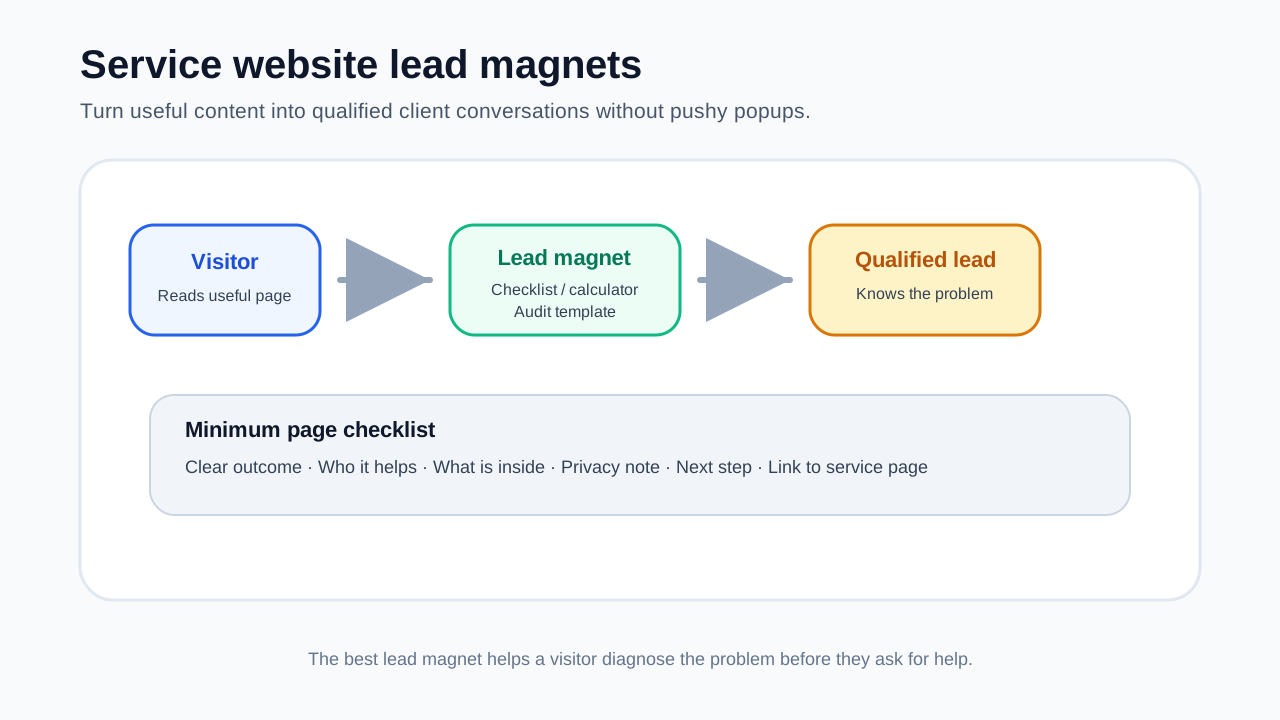
Visitor → Contact form → Sales callA lead magnet adds a middle step:
Visitor → Helpful resource → Email follow-up → Qualified inquiryThis matters because service buyers usually need time. They want to understand the problem, compare options, check whether you understand their situation, and decide whether the conversation is worth their time.
What makes a lead magnet worth an email
A good service lead magnet is not a generic PDF. It should help the visitor make progress in 10 to 20 minutes.
| Quality | What it means | Bad version | Better version |
|---|---|---|---|
| Specific | Solves one narrow problem | “Marketing guide” | “Homepage conversion checklist” |
| Fast | Easy to use today | 40-page ebook | 2-page worksheet |
| Relevant | Leads naturally to your service | Random tips | Pre-audit template |
| Diagnostic | Helps identify gaps | General advice | Scorecard or calculator |
| Trust-building | Shows how you think | Sales pitch | Helpful decision framework |
If the lead magnet does not make your paid service feel like the next logical step, it is just free content.
Five lead magnet types that work for small service websites
| Lead magnet type | Best use | Effort | Risk |
|---|---|---|---|
| Checklist | Simple audits, setup reviews, launch prep | Low | Can feel generic if too broad |
| Calculator | Pricing, ROI, savings, readiness scores | Medium | Needs clear assumptions |
| Audit template | SEO, UX, website, content, security reviews | Medium | Must avoid overpromising |
| Email mini-course | Education before consultation | Medium | Needs follow-up consistency |
| Comparison worksheet | Helping buyers choose between options | Low | Should not be biased or fake-neutral |
1. Checklist
Use a checklist when visitors know they have a problem but do not know what to inspect.
Examples:
- Website launch checklist
- Local SEO profile checklist
- Service page conversion checklist
- WordPress maintenance checklist
A checklist works best when every item is visible and actionable. Avoid vague items like “improve branding.” Use checks such as “Does the service page include price range, timeline, and next step?”
2. Calculator
A calculator works when the buyer wants to estimate value before contacting you.
Examples:
- Website redesign cost range calculator
- Lead value calculator
- SEO traffic value estimator
- Maintenance cost comparison tool
The key is transparency. Show assumptions, explain limits, and avoid fake precision.
3. Audit template
An audit template works well for consultants, designers, SEO specialists, and technical service providers.
Structure:
- Area to inspect
- What good looks like
- What warning signs mean
- Score or priority
- Recommended next action
This naturally leads to a paid audit, implementation package, or consultation.
4. Email mini-course
Use an email course when buyers need education before they trust a service provider.
Example structure:
- Day 1: Diagnose the problem
- Day 2: Compare common options
- Day 3: Avoid mistakes
- Day 4: Plan the first step
- Day 5: Invite a consultation
Keep it practical. Each email should include one task, not just theory.
5. Comparison worksheet
A comparison worksheet helps visitors choose between paths.
Examples:
- WordPress vs static site
- Freelancer vs agency
- DIY SEO vs consultant
- Template website vs custom design
This works because buyers often hesitate not because they dislike your offer, but because they have not chosen a direction.
Map lead magnets to search intent
Do not place the same lead magnet everywhere.
| Page intent | Visitor mindset | Best lead magnet |
|---|---|---|
| Informational blog post | “I am learning” | Checklist or worksheet |
| Comparison page | “I am choosing” | Comparison worksheet |
| Service page | “Can this help me?” | Audit template |
| Pricing page | “Can I afford this?” | Cost calculator |
| Case study | “Can I trust you?” | Consultation checklist |
A lead magnet should match the question that brought the visitor to the page.
Where to place the lead magnet
Start with three placements:
- After the first useful section — once the visitor understands the problem.
- Near a decision table — when they are comparing options.
- At the end — after they have consumed the page and want the next step.
Avoid popups on the first second. They interrupt before trust is built.
Landing page minimum elements
A lead magnet landing page does not need to be long, but it needs clarity.
Checklist:
- Clear headline describing the outcome
- 3-5 bullets showing what is inside
- Who it is for
- Who it is not for
- Email form with minimal fields
- Privacy note
- Confirmation of what happens next
- Link to the related service page
Follow-up without spam
A simple follow-up sequence is enough:
- Deliver the lead magnet immediately.
- Ask what they discovered.
- Share one example or mistake.
- Offer a small next step.
- Invite a consultation only when relevant.
The goal is to qualify, not pressure.
Metrics to track
Track useful metrics, not vanity numbers.
| Metric | What it tells you |
|---|---|
| View-to-download rate | Whether the offer matches the page |
| Email confirmation rate | Whether the form/process works |
| Reply rate | Whether the follow-up is useful |
| Consultation request rate | Whether the resource creates intent |
| Client conversion rate | Whether leads are qualified |
If downloads are high but consultation requests are low, your lead magnet may be too broad or disconnected from the service.
Mistakes to avoid
- Offering a generic ebook no one reads
- Asking for too much information too early
- Using the same lead magnet on every page
- Promising income, ranking, or revenue outcomes
- Sending a sales pitch immediately after download
- Hiding what happens after the form
- Forgetting to link the lead magnet back to a service page
Related OppMint guides
If you are building the full funnel, read these next:
- Service Website Lead Generation
- Content Website Service Lead Funnel
- Service Business Website Ideas 2026
- How to Build a Website for a Small Business
- Website Idea Validation Before Building
FAQ
What is the best lead magnet for a service business?
For most service businesses, a checklist or audit template is the easiest starting point. It helps visitors diagnose a problem and naturally leads to a consultation.
Should every service website have a lead magnet?
Not every page needs one, but most service websites benefit from at least one resource that captures visitors who are interested but not ready to book a call.
Can a lead magnet replace a service page?
No. A lead magnet creates trust and captures interest. The service page still needs to explain the offer, process, pricing context, proof, and next step.
Final take
A good lead magnet is not a trick to collect emails. It is a useful diagnostic tool that helps a visitor understand their problem and decide whether your service is the next logical step.