Multiple Website Hosting: When It Helps and When It Hurts
-
 OppMint Team
 - 06 Jun, 2026
Multiple website hosting can be useful when you manage several small sites, but it can also create risk if all sites share the same account, resources, or maintenance problems.
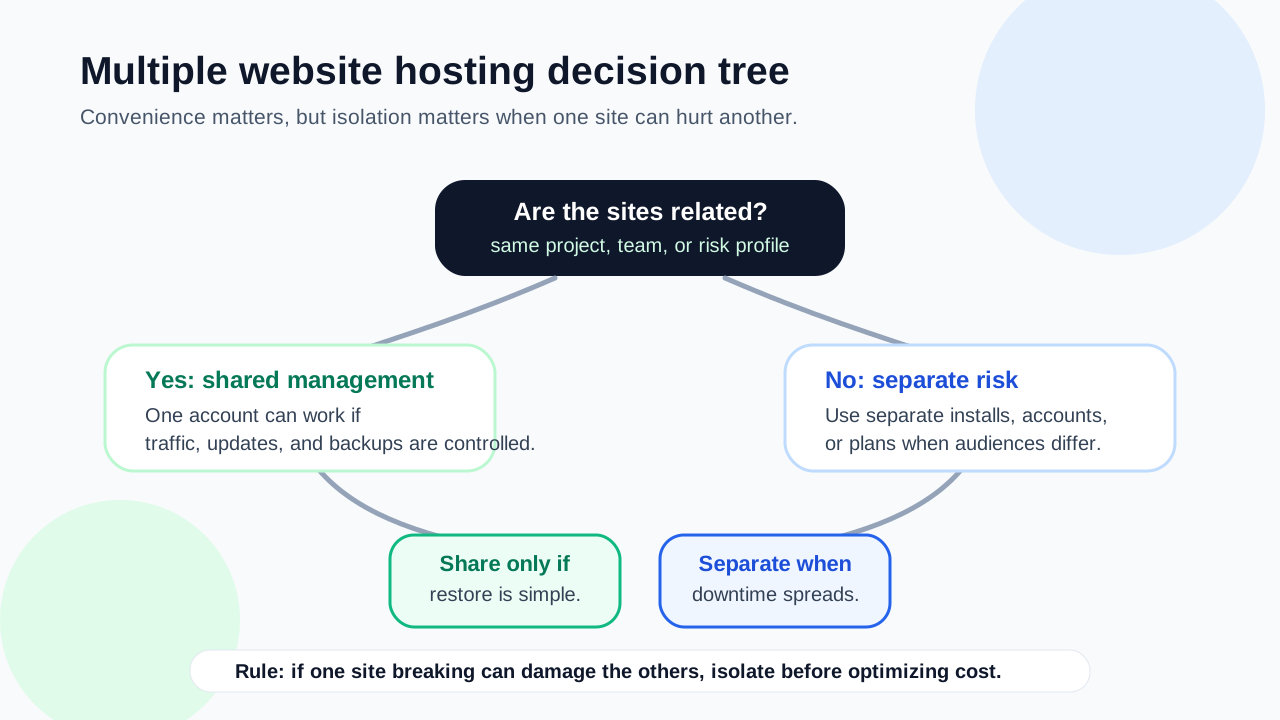
Beginners should not choose multi-site hosting just because it sounds efficient. The right setup depends on how related the sites are, who maintains them, how much traffic they get, and what happens if one site breaks.
What multiple website hosting means
Multiple website hosting usually means one hosting account can run more than one website.
This can happen through:
- separate websites in one hosting account;
- WordPress Multisite;
- multiple WordPress installs;
- reseller hosting;
- VPS hosting;
- managed hosting plans with multiple site slots;
- static sites hosted under one platform.
The phrase sounds simple, but the management model can be very different.
When hosting multiple sites can help
Multiple website hosting can help when:
- you run several small content sites;
- traffic is modest;
- the sites are related;
- you want one billing dashboard;
- you understand backup and restore controls;
- you manage updates carefully;
- each site does not need separate infrastructure.
For small operators, one account can reduce overhead. But convenience should not hide operational risk.
When it can hurt
Hosting multiple sites together can create problems when:
- one site uses too many resources;
- one hacked site affects others;
- backups are account-level only;
- restores overwrite unrelated sites;
- plugin conflicts spread across sites;
- support cannot isolate problems;
- traffic spikes on one site slow the rest;
- all sites go down together.
The more important the sites are, the more carefully you should separate risk.
Separate installs vs WordPress Multisite
WordPress sites can be managed as separate installs or as a WordPress Multisite network.
| Setup | Better fit |
|---|---|
| Separate WordPress installs | Different brands, plugins, owners, or site goals |
| WordPress Multisite | Related sites with shared management and consistent setup |
| Managed multi-site plan | Beginners who want support and site slots |
| VPS | Technical operators who can manage servers |
WordPress Multisite is powerful, but it is not automatically easier for beginners.
What WordPress Multisite does
WordPress Multisite lets one WordPress installation run a network of sites. It can centralize themes, plugins, users, and updates.
It may be useful for:
- related local pages;
- internal networks;
- school or organization sites;
- franchise-style structures;
- controlled content networks;
- agencies managing similar sites.
But it also means the sites are connected. A network-level issue can affect many sites.
When WordPress Multisite is not ideal
Avoid Multisite when each site needs:
- different plugins;
- different owners;
- separate hosting control;
- isolated backups;
- different performance profiles;
- different security requirements;
- easy migration as independent businesses.
For affiliate sites, niche sites, or small business websites with different goals, separate installs may be easier to manage.
Backups become more important
Multiple sites increase the cost of a mistake.
Before using one account for many sites, ask:
- Can each site be backed up separately?
- Can each site be restored separately?
- Are database backups separated?
- What happens if one site is infected?
- How long are backups stored?
- Are backups included or extra?
If restore controls are unclear, multi-site hosting can become risky.
Performance needs isolation
When several sites share resources, one busy or inefficient site can affect others.
Watch for:
- CPU limits;
- memory limits;
- database load;
- plugin bloat;
- heavy themes;
- image storage;
- caching conflicts;
- traffic spikes.
For small sites, shared resources may be fine. For revenue sites, ecommerce, or high-traffic projects, isolation may be worth the cost.
Security risk is shared
If multiple sites sit in one account, security problems may spread more easily.
Reduce risk by:
- keeping WordPress updated;
- removing unused themes and plugins;
- using strong passwords;
- limiting admin accounts;
- keeping backups;
- using SSL everywhere;
- monitoring suspicious changes;
- separating high-value sites when needed.
Do not put every important site into one weak account just to save money.
Cost comparison needs the full picture
Multiple website hosting can look cheaper, but check the real cost.
Compare:
- number of allowed sites;
- storage limits;
- database limits;
- backup cost;
- SSL support;
- staging support;
- email accounts;
- migration cost;
- renewal pricing;
- support level;
- resource limits.
A plan with many site slots is not useful if performance, backups, or support are weak.
A practical decision path
Use this path:
- List every site you plan to host.
- Mark which sites are business-critical.
- Decide whether sites are related or separate.
- Check traffic and plugin needs.
- Confirm per-site backups and restores.
- Check whether each site can be migrated independently.
- Start with fewer sites per account if unsure.
- Separate important sites when risk increases.
This keeps hosting decisions tied to real operations. Use the broader Domains & Hosting guide when you need to compare domain, hosting, and site setup decisions together.
When one account is enough
One hosting account may be enough when:
- sites are small;
- traffic is low;
- the sites are experiments;
- downtime is not costly;
- backups are clear;
- the same person maintains them;
- each site uses a simple setup.
This is common for early niche site testing or small portfolio projects.
When to separate sites
Separate hosting may be better when:
- a site earns revenue;
- a client depends on it;
- ecommerce is involved;
- traffic is growing;
- plugins are heavy;
- backups must be isolated;
- different owners need access;
- one site has higher security needs.
Separation costs more, but it can reduce the blast radius of problems.
Common mistakes
Avoid these mistakes:
- choosing multi-site hosting only because it says unlimited;
- ignoring resource limits;
- mixing important and experimental sites;
- assuming backups are per-site;
- using WordPress Multisite without understanding network behavior;
- giving too many people admin access;
- using the same plugins everywhere without checking need;
- waiting until all sites are slow before upgrading.
Multiple sites need more organization, not less.
Final recommendation
Multiple website hosting is useful when you manage several small, related, low-risk sites and understand backups, resource limits, and restore controls. For serious business, ecommerce, or revenue sites, separate hosting or stronger managed plans may be safer. If the site supports leads or local trust, compare the tradeoffs in Best Website Hosting for Small Business before grouping it with low-risk projects.
Do not optimize only for the cheapest account. Optimize for maintainability, recovery, performance, and risk isolation.
If you are still choosing your first host, read Best Web Hosting for Beginners. If you are building several content projects, read Blog Niche Ideas.
FAQ
What is multiple website hosting?
It means hosting more than one website under one account, server, or managed plan. The sites may be separate installs or part of a WordPress Multisite network.
Is WordPress Multisite good for beginners?
Usually not as a default choice. It can help for related networks, but separate WordPress installs are often easier for independent sites.
Can one hosting account run several websites?
Yes, if the plan allows multiple sites and has enough resources. You still need to check backups, SSL, databases, storage, and performance limits.
Is multiple website hosting cheaper?
It can be cheaper at first, but weak backups, downtime, shared risk, and resource limits can cost more later.
When should I separate websites into different hosting accounts?
Separate them when a site earns revenue, handles ecommerce, has different owners, needs isolated backups, or becomes important enough that shared downtime is risky.