Ideas & Monetization
Explore ways to make money online with website ideas, affiliate sites, content websites, SEO traffic, and practical monetization paths.
Category summary
-
 OppMint Team
 - 11 Jun, 2026
Service Website Lead Generation: From Traffic to Qualified Clients
A service website without a lead generation strategy is just an online brochure. Visitors come, glance around, and leave. You spend money on traffic and get nothing back. This guide shows how service websites turn visitors into leads and leads into paying clients. The focus is on practical tactics, not theory. Understanding the Lead Generation Funnel A service website works like a funnel: Traffic → Interest → Trust → Action → Contact → Qualification → ClientMost service websites only have the "Contact" step. That is why conversion rates are low. A better structure: Top of Funnel (TOFU): Attract general visitors with helpful content Middle of Funnel (MOFU): Capture leads with lead magnets Bottom of Funnel (BOFU): Convert leads into consultation requestsLead Magnets: The Foundation A lead magnet is something valuable you offer for free in exchange for contact information. What Makes a Good Lead MagnetSolves a specific problem Delivered immediately (PDF, checklist, template) Easy to consume (not a 50-page ebook nobody reads) Clearly connected to your paid serviceHigh-Converting Lead Magnets for Service ProvidersLead Magnet Best For Why it WorksAssessment/Quiz Consultants, coaches Personalization feels valuableChecklist Any service Quick wins build trustTemplate/Swipe File Designers, writers Immediate utilityMini Course Agencies, coaches Shows expertise over timeFree Consultation High-ticket services Low-commitment entry pointCase Study B2B services Proof of resultsExample Lead Magnet for Different Services For a web designer:Bad: "Ultimate Guide to Website Design" Good: "Website Design Brief Template (with 20 questions to ask clients)"For a marketing consultant:Bad: "Complete Marketing Guide" Good: "Free 30-Minute Marketing Audit"For a freelance writer:Bad: "How to Write Great Content" Good: "Content Workflow Template + 10 Headline Formulas"Building the Lead Capture Flow Step 1: Create a Dedicated Landing Page Do not make people navigate to find your lead magnet. Create a simple landing page: Headline: [Problem you're solving] + [Solution you're offering]Subheadline: [Who this is for] + [What they'll get]Bullet points of what's included: - [Benefit 1] - [Benefit 2] - [Benefit 3]Call to action: [Button text]Brief social proof or explanation of why you're qualifiedStep 2: Choose the Right Form Fields More fields = fewer submissions. But too few fields = unqualified leads. Start with:Email (required) Name (required) Website URL (optional, helps qualify)Add later if needed:Company name Monthly budget Timeline to start Biggest challengeStep 3: Set Up Email Follow-Up Every lead should receive:Immediate delivery of the lead magnet Follow-up email 2-3 days later with additional value Third email with soft CTA for consultationExample sequence:Email Timing Purpose1 Immediate Deliver lead magnet + welcome2 Day 3 Share related resource + ask a question3 Day 7 Offer free consultation + urgency (if applicable)Service Pages That Convert Service pages are often the most visited pages on a service website. Make them count. Structure of a Converting Service Page 1. Clear Headline State exactly what you offer and who it's for. Bad: "Services" Good: "Custom Website Design for Service Businesses Ready to Book More Clients" 2. Problem Agitation Show you understand the visitor's pain. Example: "Tired of DIY website builders that make your business look unprofessional? Spending hours maintaining a site that does not bring in clients?" 3. Solution Presentation Explain your service clearly. Include:What you do How you do it What the client gets Timeline/process overview4. Social Proof Build trust with evidence.2-3 specific testimonials (with names and companies) Results achieved for similar clients Logos of past/present clients Awards or certifications5. Pricing Transparency Whether you show exact prices or ranges depends on your service, but ambiguity hurts conversion. Options:Exact prices (works for fixed services) Starting at prices (clear floor, not ceiling) Price ranges (e.g., "$2,000 - $10,000 depending on scope") "Schedule a call for a custom quote" (only if your service varies widely)6. Call to Action Tell them exactly what to do next. Bad: "Contact Us" Good: "Schedule Your Free 30-Minute Discovery Call" or "Download Your Free Website Design Brief" Consultation Funnels Free consultations are powerful lead generators for high-ticket services. But they need structure. Setting Up a Consultation Funnel 1. Define the consultation outcome A consultation without a goal wastes everyone's time. Possible outcomes:Qualified in (schedule paid engagement) Qualified out (this is not the right fit) Ongoing relationship (follow-up nurture)2. Pre-qualify before the call Use a short form to gather key information:What service are they looking for? What is their budget? When do they want to start? What have they tried before?This helps you prepare and gives leads a chance to self-qualify. 3. Create a consultation confirmation page After booking, send them:Calendar link What to prepare What you'll cover How to reschedule if needed4. Post-consultation follow-up Send a follow-up email within 24 hours:Summary of what you discussed Next steps Proposal or estimate (if appropriate) Clear timeline for decisionConsultation Booking ToolsCalendly: Free tier, easy to set up, integrates with most tools Cal.com: Open source alternative Savy: Simple booking without feature bloat Google Calendar: If just starting outTrust Signals That Matter Service websites need to build trust quickly. Here are the trust signals that actually influence conversion: 1. Specific Testimonials Generic praise does not help. Specific results do. Bad: "Great work, highly recommend!" Good: "Alex's SEO audit helped us increase organic traffic by 47% in 4 months. We went from page 3 rankings to page 1 for our main keywords. The investment paid back in 6 weeks." — Sarah Chen, Owner, Bloom Bakery 2. Case Studies Show the before/after of working with you. Structure:Client situation (problem) Your approach (solution) Specific results (outcomes) Client quote3. Process Transparency Explain exactly how you work. This reduces uncertainty. Include:Timeline from start to finish What you need from them Key milestones What happens if things go wrong4. Personal Connection People hire people, not companies. Include:Photo of yourself (looking professional but approachable) Background story (relevant experience) Personal values or approach Availability to communicate directly5. Third-Party Validation External signals of quality:Media mentions or features Industry certifications Awards Guest appearances on podcasts Published articles or contributionsCommon Lead Generation Mistakes Mistake 1: No Clear Offer "Contact us for more information" is not a lead magnet. Fix: Create one specific, valuable lead magnet that solves a real problem. Mistake 2: Too Many Options Offering everything to everyone leads to nothing. Fix: Focus on 1-3 core services with clear positioning. Mistake 3: Ignoring Mobile Most service searches happen on mobile. Fix: Test your website on mobile. Ensure forms are easy to fill out on phones. Mistake 4: No Follow-Up Most leads are not ready to buy immediately. Fix: Set up an email sequence that nurtures leads over 2-3 weeks. Mistake 5: Hidden Contact Options If visitors cannot find how to contact you easily, they leave. Fix: Include contact options in header, at least one CTA on every page, and a clear contact page. Lead Nurturing Sequences Not every lead converts immediately. A nurture sequence keeps you in their mind until they are ready. Example 3-Email Nurture Sequence Email 1: Value Delivery (Week 1)Deliver promised lead magnet Add one additional helpful resource Ask a question to encourage replyEmail 2: Education (Week 2)Share relevant content (blog post, video, resource) Solve a small problem related to your service End with a questionEmail 3: Soft CTA (Week 3)Share a case study or success story Offer a low-commitment next step (free audit, checklist, etc.) Make booking easyWhen to Stop NurturingIf they respond asking for more information, keep going If they book a call, pause the sequence If they do not open 5+ emails in a row, move to a low-frequency list If they unsubscribe, remove them immediatelyMeasuring Lead Generation Performance Track these metrics to understand what is working: Key MetricsMetric What it measures TargetTraffic to lead rate % of visitors who become leads 2-5%Lead to consultation rate % of leads who book consults 10-20%Consultation to client rate % of consultations that close 20-40%Cost per lead How much you pay per lead Depends on traffic sourceLead quality score How qualified leads are Track over timeTools for TrackingGoogle Analytics (goal tracking) CRM (HubSpot free, Pipedrive, etc.) Email platform analytics Call tracking (if using phone numbers)Implementation Roadmap Week 1: Foundation Choose 1 lead magnet Create landing page Set up email capture form Connect to email platformWeek 2: Follow-Up Create 3-email welcome sequence Set up consultation booking (if applicable) Add testimonials to service pagesWeek 3: Optimization Add tracking to forms and buttons Review analytics after 2 weeks A/B test headline or CTAWeek 4: Scale Double down on what is working Add second lead magnet for different audience Set up lead scoring (if using CRM)Final Recommendation Lead generation for service websites is not about getting more traffic. It is about converting the traffic you already have. Start with:One compelling lead magnet A simple email follow-up sequence Clear service pages with testimonials Easy way to book a consultationOnce that is working, expand and optimize. If you need help designing your service website structure and lead generation system, see Services for OppMint's website strategy support. FAQ What is a good conversion rate for service website lead forms? A good conversion rate is 3-5% of visitors submitting a form. If you are below 2%, test your form fields, headline, and page load speed. Should I offer a free consultation? For high-ticket services ($2,000+), a free consultation is often worth it for qualified leads. For lower-ticket services, consider a lower-commitment entry point like a checklist or assessment. How many leads should I expect from my service website? This varies wildly by industry, traffic volume, and website quality. A well-optimized service website might convert 1-3% of organic traffic into leads. When should I follow up with a lead? Within 24 hours is ideal for warm leads. For cold leads from content downloads, a 3-5 day follow-up sequence works better than immediate outreach. How do I know if my lead magnet is working? Track submissions over 30 days. If you are getting fewer than 10 submissions, test a different offer, headline, or form placement.
- OppMint Team
- 09 Jun, 2026
Affiliate Content vs Service Lead Generation: Which Fits Your Website?
Affiliate content and service lead generation can both turn a website into an income asset, but they work in different ways. Affiliate content earns when readers choose a recommended product or service through a tracked link. Service lead generation earns when the site helps the right visitor contact a provider, book a call, or request help. The right choice depends on your traffic, trust, skill, offer, and maintenance capacity. A beginner website should not choose a monetization model only because it sounds passive.The core difference Affiliate content is usually product or service decision content. The page helps readers compare options, understand tradeoffs, and click out to a partner when a recommendation fits. Service lead generation is problem-to-contact content. The page helps readers understand their problem, trust a service path, and submit interest.Factor Affiliate content Service lead generationMain conversion outbound link click contact, quote, booking, intakeTraffic need often higher can work with lower but qualified trafficTrust proof honest criteria and disclosure process, fit, examples, service clarityMaintenance product/pricing/terms updates offer/process/contact updatesBest fit comparison and buying intent high-value problems and servicesBoth models need useful content. Neither works well if the page only exists to push a conversion. When affiliate content fits better Affiliate content is a better path when the reader is comparing tools, products, services, or platforms and you can explain the decision clearly. It can fit:hosting comparisons; website builder guides; software tool stacks; creator tools; niche equipment; learning resources; business services with partner programs.The page should help the reader choose, not just click. A good affiliate page explains who each option fits, who should avoid it, what to check before buying, and what alternatives exist. If you are still choosing the site structure, compare Affiliate Marketing Website Builder before building the content cluster. When service lead generation fits better Service lead generation is often better when the problem is valuable, personal, local, or complex enough that readers want help. It can fit:website setup; SEO audits; automation workflow design; local services; coaching or consulting; professional service referrals; technical implementation help.This model may work with less traffic because one qualified lead can be worth more than many low-intent ad clicks. But it requires more trust. The visitor must understand what happens after they contact you. For a service-focused path, study Content Website to Service Lead Funnel. Traffic and conversion expectations Affiliate pages often need enough traffic to generate meaningful clicks and conversions. They also need the right search intent. A broad informational article may get visitors, but a comparison or buying guide may convert better. Service lead pages can work with fewer visitors if those visitors are strongly matched to the offer. A small number of qualified inquiries may be enough for a solo operator or small service business. The practical question is not “Which model pays more?” It is:Can I attract the right visitor? Can I earn trust before asking for the conversion? Can I maintain the page accurately? Do I have a clear next step after the visitor converts?Trust requirements are different Affiliate content needs disclosure and decision criteria. If compensation may influence recommendations, readers should be able to understand that relationship clearly. The FTC's disclosure guidance is a useful baseline: commercial relationships should not be hidden. Service lead generation needs process clarity. The visitor should understand who the service is for, who it is not for, what happens after submitting a form, and what information they may need to provide. In both models, trust improves when you say who should not choose the offer. A page that admits limits usually feels more credible than a page that recommends everything. Maintenance work Affiliate content ages when:prices change; free tiers change; product features change; affiliate terms change; alternatives become better; screenshots or claims go stale.Service lead content ages when:the offer changes; intake questions change; capacity changes; service scope changes; case examples become outdated; contact paths break.If you want a low-maintenance website, do not choose a model that depends on facts you cannot keep current. A simple service page with evergreen educational content may be easier than a large affiliate comparison database. Can you combine both? Yes, but combine them carefully. A site can use affiliate content for tool recommendations and service lead generation for implementation help. Example:An article explains website builder options. It includes affiliate links where relevant and disclosed. It also explains when a reader may need setup help. A natural internal link points to a service page. The service page clarifies fit and scope.This works when the paths do not compete. It fails when every article tries to be a review, a sales page, a lead form, and a service pitch at the same time. For a broader model comparison, use How to Make Revenue From a Website. Decision matrix Use this quick guide:If your strength is... Better starting pathreviewing tools and writing comparisons affiliate contentsolving a problem directly for clients service lead generationlocal expertise service leadssoftware selection knowledge affiliate content or hybridlow traffic but high-value service service leadsbroad topic with many product choices affiliate contentstrong process and client delivery service leadsIf you are unsure, start with the path that requires the clearest next step. For many beginners, that is a small service offer connected to helpful content. For product-heavy niches, affiliate content may be the better first cluster. Next step Pick one article and define its conversion path before writing. If the reader should compare tools, write affiliate content with clear criteria and disclosure. If the reader needs help solving a problem, write service-led content with a clear contact path. A useful website can eventually use both. The first job is to make sure each page has one primary purpose. FAQ Is affiliate content more passive than service leads? It can be, but only after the content earns traffic and stays current. Affiliate pages still need updates, source checks, and disclosure. Can service lead generation work without high traffic? Yes, if the traffic is qualified and the service has clear value. A few strong leads can matter more than many low-intent visits. Should every affiliate article link to a service page? No. Link to a service page only when it is a natural next step for the reader's problem. Which model is better for beginners? Beginners with a real skill or service often validate faster with service leads. Beginners with strong product research and comparison ability may prefer affiliate content.
- OppMint Team
- 09 Jun, 2026
Best Website Ideas for Small Service Businesses in 2026
The best website ideas for small service businesses are not the flashiest homepage concepts. They are ideas that help a specific visitor understand a problem, trust the provider, and take a clear next step. That is why a service website should be chosen differently from a general content site. A small service business does not always need huge traffic. It needs qualified visitors who recognize the problem, believe the provider can help, and know what to do next.What makes a service website idea worth building? A practical service website idea has five parts:Factor What it meansClear audience You know exactly who the page helps.Clear problem The visitor already feels the pain or confusion.Trust path The site can prove credibility through examples, explanations, or process.Lead path The visitor can request help, ask a question, or compare fit.Maintenance level The owner can keep the site accurate without burning out.This is the difference between a page that looks nice and a page that supports a business. If you want a broader idea list, start with Business Website Ideas, then use this guide to narrow the idea for a service model. 1. Local service authority site A local service authority site helps people understand a service before contacting a provider. Examples:home repair advice for one city; cleaning service preparation guides; local tutoring resource pages; mobile car detailing cost and care guides; landscaping planning pages.This idea works when people search before they call. The site should include service pages, location context, FAQs, photos or examples, and a simple contact path. The mistake is writing generic local pages with no helpful detail. A stronger site explains how the service works, what affects price, what customers should prepare, and when the service is not a good fit. 2. Appointment-driven specialist site Some service businesses do not need many pages. They need a clear appointment path. Examples:consultant booking site; coaching intake site; design audit request page; technical setup service; small business website setup offer.This idea should focus on trust and qualification. The page should explain who the service is for, who it is not for, what happens before the appointment, and what the visitor needs to provide. If the service is website-related, connect it with How to Build a Website for Small Business so readers can understand the build path before asking for help. 3. Problem library plus service page A problem library is a set of helpful articles around recurring customer questions. It works especially well for services where buyers need education before they are ready to contact someone. Examples:SEO issues for local businesses; website platform decisions; content planning for solo operators; automation mistakes; analytics setup problems.The service page should not interrupt every article. Instead, each article should link to the service only when the reader has reached a natural next step. For example, a troubleshooting article can link to a diagnosis service, while a planning article can link to a setup service. This is the model explained in Turn a Content Website Into a Service Lead Funnel. 4. Comparison site for service decisions A small service business can win trust by helping buyers compare options honestly. Examples:DIY website builder vs hiring help; monthly SEO retainer vs one-time roadmap; template site vs custom site; virtual assistant vs automation workflow; content agency vs solo editor.Comparison pages should not pretend every option leads to your service. They should explain tradeoffs. A visitor who realizes they can do the work alone may not become a lead today, but the honesty can build trust for future decisions. 5. Resource hub for one business audience A resource hub serves one audience repeatedly. Examples:solo founders building their first content site; local service providers improving their website; creators turning knowledge into service leads; consultants building a trust-based web presence.The hub should group pages by problem, not by random blog dates. A visitor should be able to move from beginner questions to setup decisions to contact or service fit. This is a good choice when you can publish useful content consistently and connect it to a specific service offer. 6. Portfolio plus explanation site A portfolio alone often says, “Look what I made.” A stronger service website explains the problem, process, and result. This idea fits:designers; developers; copywriters; consultants; automation builders; SEO specialists.Each project page should explain the starting problem, the work done, the constraint, and the outcome. Do not claim results you cannot prove. If you are early, use process walkthroughs instead of fake case studies. 7. Lead qualification site A lead qualification site helps visitors decide whether they are ready before they contact you. Useful elements include:short intake questions; a “good fit / not a fit” section; expected budget or scope ranges when appropriate; preparation checklist; what happens after submitting the form.This can reduce poor-fit contacts. It also makes the service feel more professional because the visitor understands the process before the first message. How to choose the right idea Use this quick decision table:If you have... Start with...local demand and clear service area local service authority sitea high-value consultative service appointment-driven specialist sitemany repeated customer questions problem library plus service pagebuyers comparing several options comparison site for service decisionsa narrow audience you can teach resource hubvisible past work portfolio plus explanation sitetoo many poor-fit inquiries lead qualification siteDo not choose an idea only because it has search volume. Choose the model you can maintain and the next step you can actually deliver. Content and SEO considerations Google's helpful content guidance is a useful reminder: pages should serve people first. A service website should not publish thin pages just to target every possible keyword variation. For small service sites, useful content usually means:explaining the decision clearly; showing what affects cost or scope; answering real buyer questions; linking to the next relevant page; keeping claims current; making contact options easy to understand.The site structure matters too. A service page, trust page, topic guide, and contact page should support each other. If every article is isolated, the site will feel like a pile of posts instead of a business system. Next step Pick one audience, one service problem, and one conversion path. Then build the smallest useful version of the site: one service page, one trust page, three helpful articles, and a clear contact path. If you already have useful content but no conversion structure, compare it with the service funnel model in Content Website to Service Lead Funnel. If you need a broader setup plan, use Business Website Setup before adding more pages. FAQ What is the best website idea for a small service business? The best idea is usually a focused service site that explains one audience, one problem, and one clear next step. Local authority sites, problem libraries, and appointment-focused sites are often practical starting points. Do small service websites need a blog? Not always. A blog helps when buyers search for questions before contacting you. If visitors already know they need the service, a clear service page and trust page may matter more. Can a service website work with low traffic? Yes. Service leads can be valuable even with modest traffic if the visitors are qualified and the offer is clear. Should I build a lead generation site or a service site? Build a service site if you deliver the service yourself. Build a lead generation site if your role is to connect visitors with another provider and you can handle trust, privacy, and follow-up responsibly.
- OppMint Team
- 08 Jun, 2026
Turn a Content Website Into a Service Lead Funnel
A content website does not have to earn only from ads or affiliate links. If the site teaches a useful skill, explains a business problem, or attracts people with a clear need, it can also become a service lead funnel. That does not mean every article should become a sales page. It means your helpful content should create trust, explain the problem, and show the reader when a service is the next reasonable step.A service funnel starts with a real problem A weak service funnel starts with a button that says “Book a call.” A stronger funnel starts with a problem the reader already understands. For example:a beginner cannot choose a website platform; a site owner has traffic but no leads; an affiliate site has content but no internal structure; a small business needs a starter website; a creator wants automation but does not know what to automate.The content page should help the reader diagnose the problem. The service page should explain what happens if they want help solving it. Map content to service intent Not every article should sell the same service. Map the article type to the next step.Content type Reader need Natural service pathbeginner guide needs a starting path website starter setupSEO checklist needs diagnosis and priorities SEO starter roadmapaffiliate tutorial needs structure and monetization affiliate site setupautomation article needs workflow design automation AI workflow setuphosting guide needs launch support website starter setupThis is why a service funnel needs more than traffic. It needs a clear relationship between the page and the offer.If your site is still early, the Services page should not feel disconnected from the content. It should look like the next step for readers who want help executing the same ideas. Build trust before the call to action A content site earns trust by being useful before it asks for anything. The reader should feel that the page helped them understand the problem, not that it pushed them into a funnel too early. Useful trust elements include:clear explanations; decision tables; examples; mistakes to avoid; plain language; realistic timelines; what is included and not included; when the reader can do it alone.That last point matters. If a reader can solve the problem alone, say so. A service offer becomes more credible when it is not presented as the only option. Use soft CTAs inside the article A soft CTA connects the current problem to a next step without interrupting the reading experience. Bad CTA:Hire us now.Better CTA:If you already know the site idea but need help turning it into a launch plan, the website starter setup service is the next place to compare scope and fit.The second version explains when the service is relevant. It does not pressure every reader. Use one or two soft CTAs in a long article. Too many service links can make a helpful page feel like a sales page. The goal is to guide the right reader, not push everyone. Design the service page as a decision page A service page should not only say what you sell. It should help the reader decide whether the service fits. Include:who it is for; who it is not for; the problem it solves; what is included; what is not included; what the client needs to provide; what happens after contact; realistic limits.This makes the service page easier to trust. It also filters out poor-fit leads before they contact you. Track leads without overcomplicating the site You do not need an advanced CRM on day one. Start with simple tracking:which article sent the visitor; which service page they visited; which form they submitted; what problem they described; whether the lead was qualified.Analytics and form data should help you improve the funnel, not spy on users. Be transparent about data collection and keep the form short. A practical service funnel blueprint A simple funnel can look like this:Publish a helpful article around a real problem. Add one internal link to the relevant service page. Make the service page clear about fit and scope. Add a short contact path. Follow up with a specific question, not a generic pitch. Review which articles produce useful leads. Improve the content and service page based on real questions.This path can work even with modest traffic because service leads can be worth more than ad clicks. But it only works when the content, offer, and reader problem match. Next step If your content site already has useful articles but no clear conversion path, start by mapping your top five articles to the most relevant service page. If no service page fits, that is a signal to clarify your offer. For OppMint, the natural next steps are Services, SEO Starter Roadmap, and Automation AI Workflow Setup, depending on the problem your content attracts.
- OppMint Team
- 06 Jun, 2026
Beginner's Guide: Real People Who Make Money Online (And How They Did It)
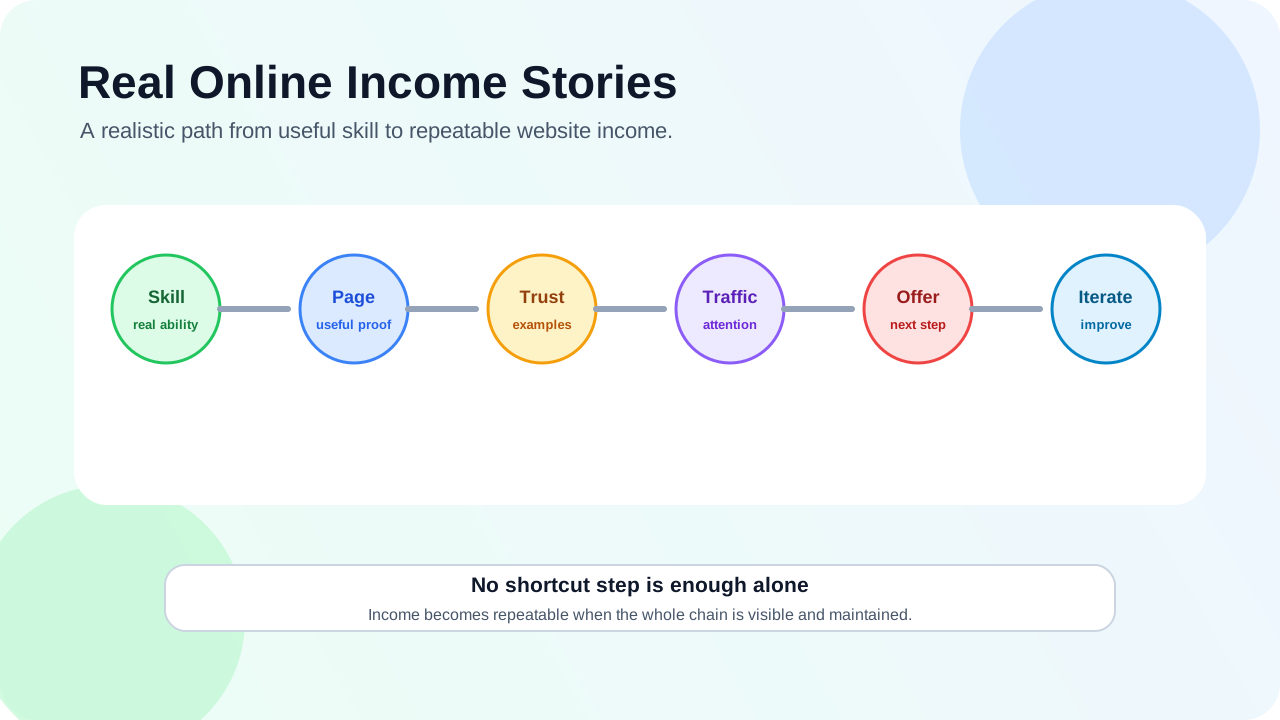
Everyone wants to know how to make money online, but most advice skips the messy, real part: the mistakes, the false starts, and the small wins that actually work. This post shares stories from real people who went from zero to making money online—no get-rich-quick schemes, just honest experiences.Story 1: Sarah went from $0 to $2,000/month with affiliate content Sarah was a stay-at-home mom who wanted to earn extra money. She started a blog about budget-friendly baby gear. What worked:She wrote detailed comparison posts about baby products she actually used She focused on specific problems: "best car seat for small cars," "affordable cloth diapers" She added affiliate links only after building trust with helpful contentHer mistakes:First month: She tried to review 10 products in one post—too broad, no depth She forgot disclosure at first (fixed after learning about FTC rules)Her advice: "Start with what you know. I wrote about baby gear because I was living it. Readers could tell I wasn't just copying descriptions." Story 2: Mike made $1,500/month fixing WordPress sites Mike was a high school teacher who learned basic WordPress to build his own site. He started helping friends fix their sites for free, then turned it into a business. What worked:He created a simple service page: "I fix WordPress problems—fast and affordable" He showed before/after examples on his site He offered a free 15-minute troubleshooting call to build trustHis mistakes:He underpriced at first ($25/hour)—raised to $75 after realizing his time was valuable He didn't set clear boundaries—now he uses a booking system with set packagesHis advice: "You don't need to be an expert. Most small business owners just need someone who speaks their language and solves their problem quickly." Story 3: Lisa earned $3,000/month selling templates Lisa was a graphic designer who created custom Notion templates for her own use. She shared one on Twitter, got requests for more, and started selling them. What worked:She identified a specific pain point: "Notion templates for freelance writers" She offered a free sample template to build an email list She updated templates based on customer feedbackHer mistakes:She tried to make templates for everyone—narrowed to freelance writers after 3 months She didn't have a refund policy at first (added after one customer asked)Her advice: "Build what you need first. If it solves your problem, chances are others need it too." Story 4: Raj built a local lead gen site for plumbers Raj lived in a small city and noticed local plumbers had terrible websites. He built a site that helped homeowners find reliable plumbers—and earned commissions for referrals. What worked:He focused on one city: "Best Plumbers in [City Name]" He wrote helpful content: "How to fix a leaky faucet (and when to call a pro)" He verified plumbers before recommending themHis mistakes:He tried too many cities at once—stuck with one city until it was profitable He didn't track which plumbers converted—added a simple form to track leadsHis advice: "Local is underrated. Big sites ignore small cities. You can be the go-to resource for your area." The common thread in all these stories Every successful person in these stories did three things:Started small - They didn't try to build an empire day one Solved a specific problem - They didn't chase "make money online"—they solved a real pain Built trust first - They helped before asking for money5 lessons from their mistakesDon't try to be everything to everyone - Narrow your focus Charge what you're worth - Underpricing hurts you and devalues your work Set clear boundaries - You're not available 24/7 Learn from feedback - Your first product/service won't be perfect Track what works - You can't improve what you don't measureHow to apply these stories to your journey Use this simple framework:Pick one problem - What do you see people struggling with that you can help solve? Choose one method - Affiliate, services, digital products, or local leads? Build the smallest version - One page, one offer, one way to help Launch and learn - Get feedback, improve, repeatThe #1 mistake beginners make (and how to avoid it) The biggest mistake is waiting for everything to be perfect. These successful people all launched with imperfect websites, imperfect products, and imperfect processes. Instead of: "I need a perfect website before I start" Try: "I'll launch with one page that explains what I do and how to contact me" Final recommendation Making money online isn't about finding a secret formula. It's about helping someone solve a problem, doing it well, and being honest about it. Start with what you know, focus on one audience, and don't be afraid to start small. The stories above show that regular people can do this—you don't need special skills or huge budgets. If you're ready to take the first step, read How to Start Your First Online Business in 30 Days. For help choosing a monetization path, check out Monetization Paths for Beginners. FAQ Do I need technical skills to make money online? No. Sarah had no technical skills—she used a website builder. Mike learned WordPress as he went. Focus on solving a problem, not mastering technology. How long does it take to make the first dollar? It varies. Mike made his first dollar in 2 weeks (a friend paid him $50 to fix her site). Sarah took 3 months to get her first affiliate sale. Be patient—trust takes time. Do I need to spend money to start? You can start for free with tools like Canva, Google Docs, and free website builders. You'll probably want a domain and hosting eventually ($10-$30/month), but you can validate first without it. What if I don't have any ideas? Look at your own life. What problems have you solved recently? What tools do you use that others might struggle with? That's your starting point. Is it really possible to make a living online? Yes, but it takes time and consistency. Most people start as a side hustle, then grow it. The stories above started small and scaled up over 6-12 months.
- OppMint Team
- 06 Jun, 2026
Affiliate Marketing Website Builder: What Beginners Should Choose
Choosing an affiliate marketing website builder is really a choice about control, content, SEO, cost, and how much technical work you are willing to handle. The best builder is not the one with the flashiest templates. It is the one that lets you publish helpful decision-focused content, keep pages organized, add disclosures, manage internal links, and grow without rebuilding everything too soon.What an affiliate website builder must support An affiliate site needs more than a homepage and a few buttons. At minimum, your builder should support:blog posts or articles; category or hub pages; clean URLs; editable title tags and descriptions; fast-loading pages; internal links; comparison tables or structured sections; disclosure placement; basic analytics integration; easy content updates.Google's SEO Starter Guide focuses on helping search engines understand your content and helping users find useful pages. A builder that makes those basics difficult is not ideal for affiliate marketing. The main builder options Most beginners choose between four paths:WordPress. Hosted website builders. Static site generators. Ecommerce-style platforms.Each can work, but they fit different people. Option 1: WordPress WordPress is one of the most flexible choices for affiliate content websites. It is strong for:article publishing; category pages; plugins; SEO controls; comparison tables; content updates; long-term ownership; many hosting options.It also requires more setup than some hosted builders. You need hosting, a theme, basic maintenance, updates, backups, and security awareness. WordPress's own beginner documentation starts with planning, installation, setup, and publishing. That staged mindset is useful: do not install every plugin before you know what your affiliate site actually needs. Best fit: beginners who want long-term content control and are willing to learn basic site management. Option 2: Hosted website builders Hosted builders can be easier for a first affiliate site because they handle hosting, templates, security, and many setup details. They are strong for:quick setup; visual editing; templates; simple landing pages; low maintenance; beginners who dislike technical setup.They may be weaker for deep content sites if blogging, taxonomy, speed, URL control, or advanced SEO settings are limited. Best fit: beginners who need a simple site quickly and are testing a niche before committing to a larger content operation. Option 3: Static site generators Static sites can be fast and secure, but they usually require more technical comfort. They are strong for:speed; low hosting complexity; clean code; version control; custom layouts; developer workflows.They are weaker if you want non-technical editing, plugin marketplaces, or quick visual changes. Best fit: technical builders who want speed and control without a traditional CMS. Option 4: Ecommerce-style platforms Some people try to build affiliate sites with ecommerce platforms. This can work for product catalogs, but it is often not the best first choice for content-heavy affiliate SEO. These platforms are strong for:product-style layouts; collections; checkout flows; brand storefronts.But affiliate sites usually need articles, comparisons, tutorials, and educational content more than cart features. Best fit: affiliate projects that look more like curated product stores than educational blogs. How to compare builders Use this table before choosing.Factor Why it matters for affiliate sitesContent depth You need many helpful pages, not only landing pages.SEO controls Titles, descriptions, URLs, headings, and indexability matter.Internal linking Related pages should connect naturally.Disclosure placement Affiliate disclosure should be visible where links appear.Speed Slow pages reduce trust and user experience.Ownership You should understand what you control and what the platform controls.Cost Low initial cost can become expensive after upgrades.Portability Moving later should not be impossible.Google's helpful content guidance is a useful reminder: the platform does not make weak content strong. Choose a builder that lets you create useful pages, then focus on the pages themselves. What beginners often overvalue Beginners often choose builders based on:beautiful homepage templates; animations; trendy design; huge plugin lists; one-click AI content features; promises of fast monetization.Those can be distracting. An affiliate site succeeds or fails mostly on audience fit, useful content, trust, SEO structure, and recommendation quality. A plain site with helpful pages is better than a polished site with thin content. What beginners often undervalue More important factors include:how easy it is to update old articles; whether category pages can become useful hubs; whether you can add comparison sections; whether pages load quickly on mobile; whether you can add clear disclosure; whether you can change URLs carefully; whether the builder supports long-form content well.These details matter after the first week, when you start publishing consistently. Recommended beginner paths If you want the most control Choose WordPress with simple hosting, a lightweight theme, and only the plugins you need. If you want the easiest start Choose a hosted builder, but confirm it supports blogging, custom URLs, SEO fields, and enough content organization. If you are technical Choose a static site generator if you want speed, version control, and custom publishing workflows. If you are testing the niche Start with the simplest builder that lets you publish five to ten useful pages. Upgrade later only when the niche shows real promise. Builder checklist for affiliate marketing Before committing, check whether the builder lets you:create article categories; edit SEO title and description; add custom headings; insert comparison tables or structured blocks; place disclosure near affiliate links; create clean internal links; add an about page and contact page; publish privacy and disclosure pages; keep pages fast on mobile; export or migrate content if needed.If a builder fails several of these, it may still be fine for a portfolio or landing page, but not for a serious affiliate content site. A small site structure to build first Do not start by designing every possible page. Build this first:Homepage or niche hub. About page. Affiliate disclosure page. One category page. Three educational articles. Two comparison pages. One setup or checklist article.The SBA's business plan guidance asks business owners to define customers, products, operations, and sales. For an affiliate website, your first structure should answer similar questions: who you help, what decisions you cover, and how the site earns without confusing the reader. Final recommendation For most beginners, WordPress is the strongest long-term affiliate marketing website builder because it balances content control, SEO flexibility, ownership, and growth. A hosted builder can still be a good starting point if you need simplicity and are testing a niche. Choose the builder based on the kind of affiliate site you want to run: content-heavy, comparison-focused, technical, simple, or store-like. Then build the smallest useful version and publish helpful pages before adding complexity. If you are still planning your affiliate structure, read How to Build an Affiliate Website. If you need broader site setup guidance, go to Build Websites. FAQ What is the best website builder for affiliate marketing? For content-heavy affiliate sites, WordPress is often the best long-term choice. Hosted builders can work for simpler sites if they support blogging, SEO fields, clean URLs, and disclosure placement. Can I use a free website builder for affiliate marketing? You can test ideas with free tools, but free plans often limit branding, SEO control, domain ownership, or monetization features. A serious affiliate site usually needs more control. Do I need WordPress for an affiliate website? No. WordPress is common, but hosted builders and static sites can also work. The right choice depends on your technical comfort, content plan, and growth needs. What pages does an affiliate website need first? Start with a homepage or niche hub, about page, disclosure page, a few educational articles, comparison pages, and clear internal links. Should I choose the easiest builder or the most flexible builder? Choose the easiest builder that still supports your content and SEO needs. If you plan to publish deeply for years, flexibility matters more.