Complete SEO Audit for a Small Website
-
 OppMint Team
 - 06 Jun, 2026
A complete SEO audit helps you find the issues that stop a website from being discovered, understood, indexed, and improved. For a small website, the audit does not need to be complicated, but it does need to be systematic.
The goal is not to create a long report. The goal is to decide what to fix first so the site can grow.
What a complete SEO audit covers
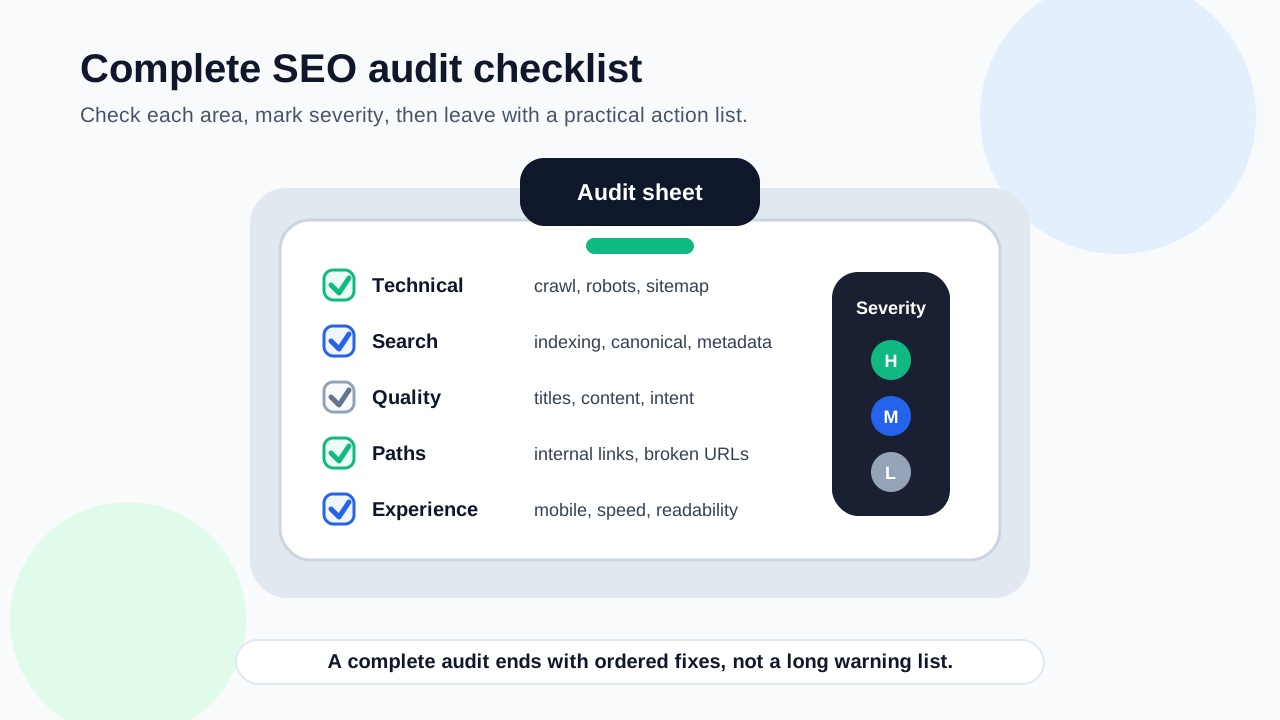
A practical audit should cover:
- crawlability;
- indexing;
- sitemap and robots rules;
- titles and descriptions;
- content usefulness;
- internal links;
- broken links and redirects;
- mobile experience;
- page speed;
- post-audit priorities.
Each section should lead to a clear action.
1. Check crawlability
Search engines need to access your important pages.
Check whether:
- pages return successful status codes;
- important URLs are not blocked by robots rules;
- internal links are visible and crawlable;
- pages are not hidden behind scripts only;
- navigation and category paths work;
- important pages are not buried too deeply.
If search engines cannot crawl a page, content improvements may not be seen.
2. Check indexing status
Crawled pages are not always indexed.
Use Search Console and page review to identify:
- pages discovered but not indexed;
- duplicate or low-value pages;
- pages with weak content;
- pages with unclear intent;
- pages with canonical issues;
- important pages missing from search results.
Indexing problems often point to quality, duplication, or discovery issues.
3. Review the sitemap
A sitemap should help search engines discover the URLs you want crawled.
Confirm:
| Sitemap check | Good result |
|---|---|
| Sitemap exists | It loads successfully |
| Important URLs included | Core pages are listed |
| Draft pages excluded | Private or thin pages are not submitted |
| Old URLs removed | Deleted pages are not promoted |
| Search Console reads it | Discovery can be monitored |
A sitemap supports discovery, but it does not replace internal links.
4. Review robots rules
Robots rules can accidentally block important sections.
Check whether:
- public pages are crawlable;
- admin, private, or test areas are handled intentionally;
- the sitemap is referenced when useful;
- rules do not conflict with your site structure;
- important category or article pages are not blocked.
A small mistake here can cause a large SEO problem.
5. Check titles and descriptions
Every important page should have a clear title and description.
Look for:
- missing titles;
- duplicate titles;
- vague titles;
- descriptions that do not match the page;
- titles that are too long or confusing;
- repeated keyword stuffing;
- pages where the topic is unclear.
A title should help both searchers and search engines understand the page.
6. Audit content quality
A complete audit must review the actual page, not only technical fields.
Ask:
- Does the page answer a real search intent?
- Is the page type correct for the query?
- Does the page give practical next steps?
- Are claims realistic and supported?
- Does the page include examples, checklists, or decisions?
- Is the content too thin or too generic?
- Does it overlap another page too closely?
Useful content is the reason a page deserves to be indexed and ranked.
7. Check internal links
Internal links connect your content into a site structure.
Review:
- orphan pages;
- important pages with few incoming links;
- broken internal links;
- redirected internal links;
- vague anchor text;
- missing links between related pages;
- pages that should point to services, tools, or next-step guides.
Internal links should help visitors continue naturally.
8. Check broken links and redirects
Broken links create bad user paths and waste crawl signals.
Check for:
- 404 pages;
- old internal URLs;
- redirect chains;
- links to removed pages;
- links where the destination no longer matches the anchor;
- external links that are no longer useful.
Fix internal broken links first because they are fully under your control.
9. Check mobile experience
Most websites need to work well on phones.
Review:
- navigation;
- font size;
- tap targets;
- table behavior;
- image scaling;
- spacing;
- whether key content appears without friction.
A page can be technically indexed but still perform poorly if mobile visitors cannot use it.
10. Check page speed
Speed matters because slow pages hurt users.
Focus on:
- image size;
- unnecessary scripts;
- layout shifts;
- render-blocking assets;
- mobile loading experience;
- whether the page feels usable quickly.
Do not treat speed as separate from content. Both affect whether the page is useful.
11. Prioritize fixes
After the audit, group fixes by impact.
| Priority | Fix type |
|---|---|
| Critical | Blocked pages, broken important pages, noindex mistakes |
| High | Sitemap/indexing issues, duplicate titles, thin key pages |
| Medium | Weak internal links, vague anchors, slow important pages |
| Low | Minor formatting warnings, small metadata refinements |
A complete audit should end with a short action list, not a giant spreadsheet. For a quick diagnostic before a full review, you can also check website SEO score and then verify the findings manually.
Complete SEO audit checklist
Use this checklist:
| Area | Question |
|---|---|
| Crawlability | Can search engines reach important pages? |
| Indexing | Are useful pages indexed or indexable? |
| Sitemap | Are important URLs submitted? |
| Robots | Are public pages not blocked? |
| Titles | Are titles unique and clear? |
| Descriptions | Do descriptions match the page? |
| Content | Does each page satisfy intent? |
| Internal links | Are important pages connected? |
| Broken links | Are bad paths fixed? |
| Mobile | Can phone users use the page easily? |
| Speed | Does the page load well enough? |
| Priorities | Is there a clear fix order? |
This covers the foundation most small sites need.
Final recommendation
Run a complete SEO audit by checking crawlability, indexing, sitemap, robots rules, titles, content usefulness, internal links, broken links, mobile experience, and speed. Then prioritize fixes by impact so the audit becomes an improvement plan.
If you need tool selection first, read Best SEO Audit Tool. If you are working page by page, use the On Page SEO Checklist.
FAQ
What is a complete SEO audit?
A complete SEO audit reviews crawlability, indexing, sitemap, robots rules, titles, descriptions, content quality, internal links, broken links, mobile usability, speed, and priorities.
How often should I run an SEO audit?
Run a full audit before launch, after major redesigns, and periodically as the site grows. Review important pages more often when traffic or indexing changes.
Is technical SEO enough for a complete audit?
No. Technical checks are important, but content usefulness, search intent, internal links, and user experience also matter.
What should a beginner fix first?
Fix blocked pages, broken important pages, sitemap and indexing issues, duplicate titles, thin key content, and missing internal links before minor warnings.
Do small websites need full SEO audits?
Yes, but the audit can be lightweight. A simple checklist is enough if it covers the core discovery, content, link, and user experience issues.