Best WordPress Website Builder: How Beginners Should Choose
-
 OppMint Team
 - 06 Jun, 2026
The best WordPress website builder is the one that helps you create useful pages without making the site slow, confusing, or hard to maintain.
WordPress gives beginners more control than many hosted builders, but that control comes with choices: hosting, themes, plugins, page builders, blocks, performance, updates, and SEO setup.
What a WordPress website builder means
A WordPress website builder can mean different things.
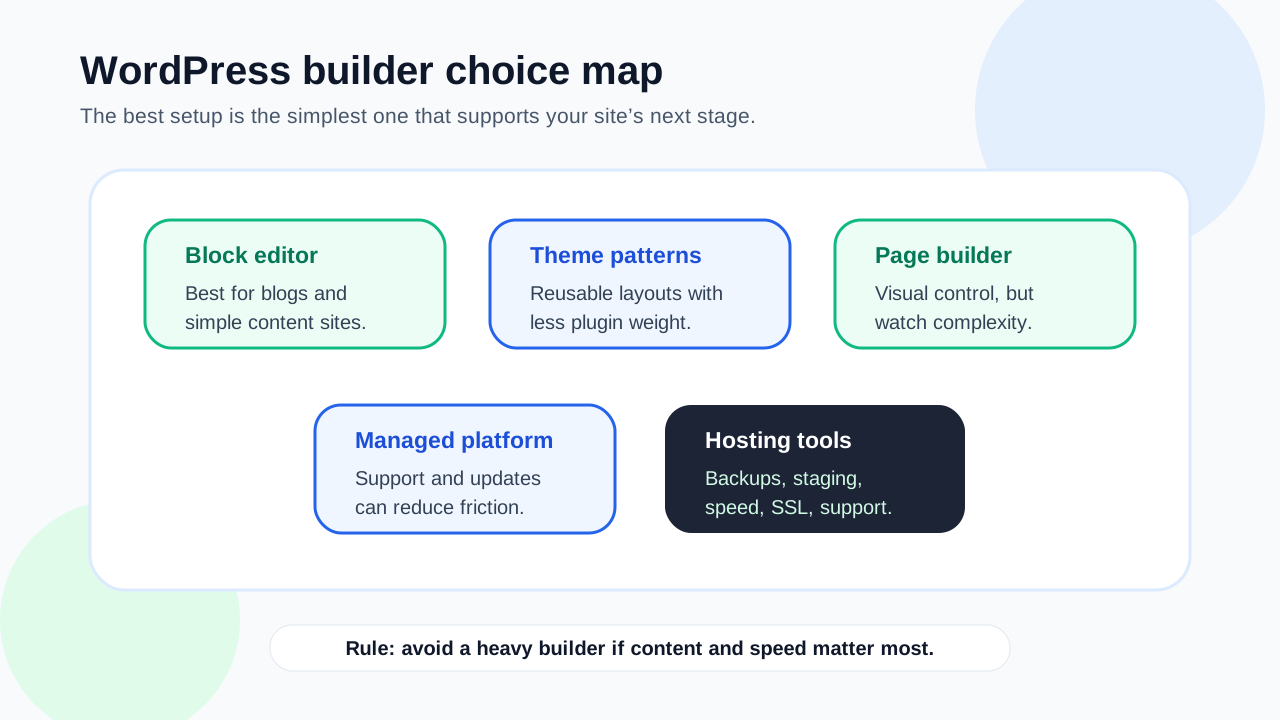
It may refer to:
- the WordPress block editor;
- a WordPress theme with patterns;
- a page builder plugin;
- a managed WordPress platform;
- a full site editing setup;
- a hosting plan with WordPress tools.
For beginners, the question is not which tool has the most features. The better question is: which setup lets you build the site you need without creating maintenance problems?
Start with your website type
Different WordPress sites need different builder choices.
| Site type | Builder priority |
|---|---|
| Simple business site | Easy editing, reliable theme, contact path |
| Blog | Clean writing experience, fast posts, categories |
| Affiliate site | Content structure, internal links, SEO fields |
| Service site | Landing pages, trust signals, forms |
| Content hub | Reusable templates, navigation, performance |
| Ecommerce site | Product layout, checkout compatibility, support |
A visual builder that works for a landing page may be too heavy for a large content site. A lightweight block setup may be better for SEO content but less visually flexible.
WordPress block editor can be enough
Many beginners can start with the WordPress block editor and a good theme.
This can work when:
- the design is simple;
- content matters more than complex layouts;
- speed is important;
- you want fewer plugin dependencies;
- you plan to publish blog posts regularly;
- you want a setup that is easier to maintain.
The block editor is not always the fastest way to create custom designs, but it can be a safer foundation for many content sites.
Page builder plugins add flexibility
Page builder plugins can make visual design easier. They often help with landing pages, sections, templates, and drag-and-drop editing.
They may help when:
- you need custom-looking pages;
- design control matters;
- the site needs reusable sections;
- non-technical editors need visual control;
- you are building service or sales pages.
The tradeoff is that some builders can add complexity, extra scripts, lock-in, or performance work.
Performance should influence the choice
WordPress performance depends on hosting, theme, plugins, images, caching, and database behavior. A builder is only one part of the system, but it can affect page weight and maintainability.
Before choosing, ask:
- Does the builder create heavy pages?
- Does it load unnecessary scripts?
- Does it work with caching?
- Are images easy to optimize?
- Does it produce mobile-friendly layouts?
- Can you remove unused sections and plugins?
A slow website can hurt user experience even if the design looks good.
SEO control matters for content sites
Google’s SEO Starter Guide emphasizes clear, useful, understandable pages. Your WordPress builder should support that work.
Check whether it works well with:
- page titles;
- meta descriptions;
- heading structure;
- readable URLs;
- internal links;
- image alt text;
- mobile layout;
- schema or SEO plugins when appropriate;
- crawlable content.
A builder should not bury important content inside confusing layouts or make headings difficult to manage.
Hosting still matters
A WordPress builder does not replace hosting. WordPress still needs a compatible hosting environment, PHP, database support, file storage, backups, SSL, and updates.
Good hosting helps with:
- reliability;
- speed;
- backups;
- SSL;
- staging;
- support;
- update safety;
- migration options.
Do not choose a heavy builder and expect weak hosting to hide the problems.
Think about plugin dependence
WordPress is powerful because of plugins, but too many plugins can create maintenance and performance problems.
Before choosing a builder, consider:
- how many extra plugins it requires;
- whether those plugins are actively maintained;
- whether the site breaks if the builder is disabled;
- how updates are handled;
- whether support is available;
- whether the builder works with your theme.
A builder that looks easy on day one can become difficult if it depends on many moving parts.
Editing experience for beginners
A good WordPress builder should make common edits easy.
Test whether you can:
- edit a homepage section;
- create a blog post;
- change a service page;
- add a call to action;
- update navigation;
- adjust mobile layout;
- reuse a section;
- preview before publishing;
- understand what is theme-level and what is page-level.
If simple edits feel risky, the setup may be too complex for a beginner site.
A beginner decision framework
Use this framework:
- If you are mainly blogging, start with a lightweight theme and the block editor.
- If you need custom service or landing pages, consider a visual builder carefully.
- If you need ecommerce, choose based on checkout and product compatibility.
- If you are nontechnical, prioritize support and update safety.
- If SEO content matters, prioritize speed, headings, URLs, and internal linking.
- If the site may grow, avoid setups that are hard to migrate or simplify.
Choose the simplest setup that supports the site’s next stage.
When to avoid a heavy builder
Avoid an overly heavy builder when:
- the site is mostly articles;
- page speed is already a concern;
- you do not need custom visual layouts;
- the builder requires many add-ons;
- you cannot maintain updates;
- you are using low-end hosting;
- the site owner only needs simple editing.
More design control is not always better if it creates long-term friction.
When a visual builder is worth it
A visual builder may be worth it when:
- service pages need strong design;
- landing pages support paid or organic campaigns;
- the business needs reusable content sections;
- nontechnical staff will edit pages visually;
- you have support for performance and maintenance;
- design flexibility affects conversion.
In that case, choose carefully and keep the site lean.
Common mistakes
Avoid these WordPress builder mistakes:
- installing several builders at once;
- choosing by demo design only;
- ignoring hosting quality;
- using too many add-ons;
- forgetting mobile layout;
- treating SEO plugins as a ranking guarantee;
- ignoring backups before major edits;
- building complex pages before content is clear;
- choosing a setup you cannot maintain.
WordPress can grow with a site, but only if the foundation stays understandable.
Final recommendation
The best WordPress website builder depends on the site goal. For content-heavy beginner sites, a lightweight theme and WordPress block editor may be enough. For service pages, landing pages, and visual layouts, a page builder can help if you manage performance and plugin complexity.
Start with content, structure, speed, and maintenance before design effects. A useful WordPress site is easier to grow than a beautiful site that is slow or hard to update.
If you are still choosing WordPress hosting, read Best Web Hosting for Blog. If you are comparing builder types more broadly, read Best Website Builder for Beginners.
FAQ
What is the best WordPress website builder for beginners?
For many beginners, the WordPress block editor with a lightweight theme is enough. A visual page builder can help when custom layouts and landing pages matter.
Do I need a page builder for WordPress?
Not always. Blogs and simple business sites can often use the block editor. Page builders are more useful for custom designs, landing pages, and reusable visual sections.
Can a WordPress builder hurt performance?
It can if it adds heavy scripts, too many add-ons, large images, or complex layouts. Hosting, caching, theme quality, and plugin choices also affect speed.
Is WordPress better than hosted website builders?
WordPress can offer more flexibility, content control, and SEO structure. Hosted builders can be easier for small sites that need less customization.
What should I check before choosing a WordPress builder?
Check editing ease, mobile output, SEO control, performance, plugin dependence, theme compatibility, backups, support, and whether the setup fits your website goal.