Content Strategy Tools: What Beginners Actually Need
-
 OppMint Team
 - 06 Jun, 2026
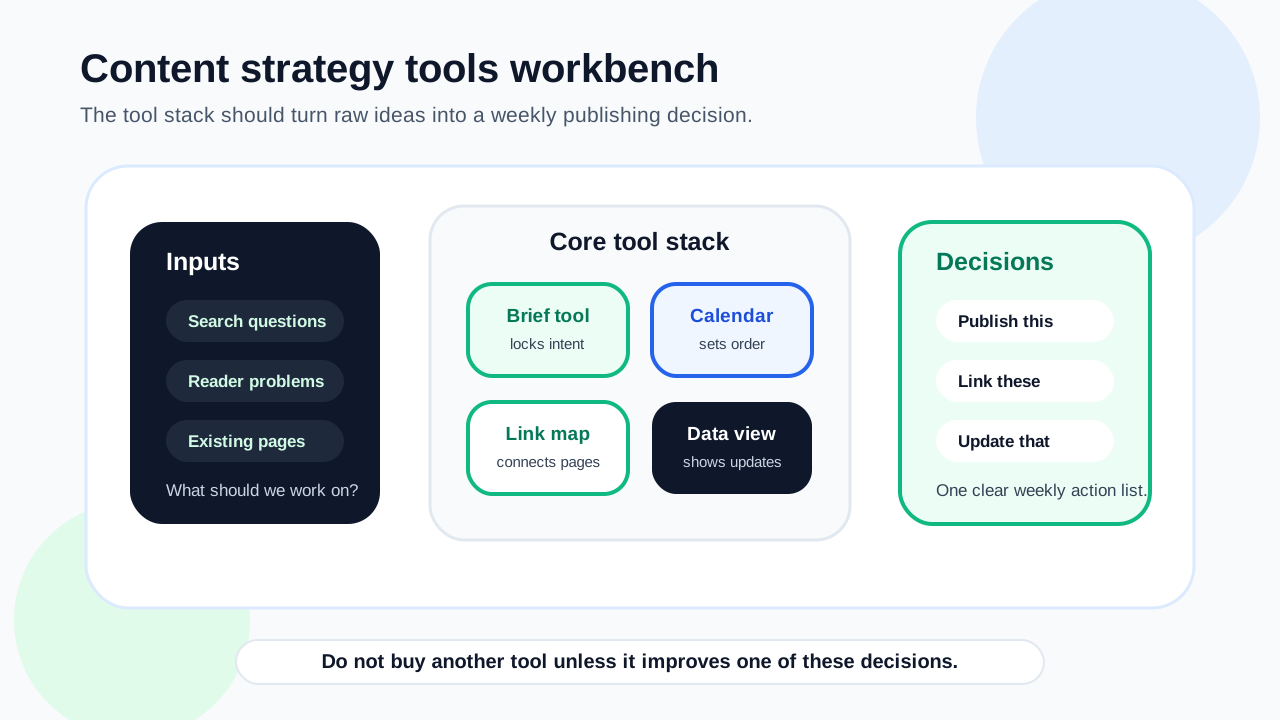
Content strategy tools help you choose topics, organize content, write briefs, check performance, plan internal links, and update pages. Beginners do not need every tool. They need a simple workflow.
The best tool stack is the one that helps you publish useful pages and improve them with evidence, not the one with the most dashboards.
What content strategy tools should help with
A useful content strategy workflow usually needs help with:
- topic discovery;
- keyword organization;
- search intent review;
- content briefs;
- editorial planning;
- internal linking;
- SEO checks;
- performance monitoring;
- content updates.
You can start with simple tools and upgrade only when the bottleneck becomes real.
Keyword research tools
Keyword tools help you find what people search for and group related topics.
Use them to identify:
- topic demand;
- keyword variations;
- beginner questions;
- comparison terms;
- tool or service terms;
- content gaps;
- possible clusters.
Do not choose topics only because a keyword has volume. The topic must fit your site’s audience and monetization path.
Search Console
Search Console is one of the most important tools after publishing.
It helps you see:
- which pages get impressions;
- which queries trigger pages;
- which pages get clicks;
- whether pages are indexed;
- whether Google reports crawl or indexing issues;
- which pages may need better titles or updates.
For beginners, this is often more useful than guessing from third-party estimates alone.
Content brief tools
A content brief keeps each article focused.
A good brief should define:
- target keyword;
- search intent;
- audience;
- angle;
- required sections;
- internal links;
- sources or evidence;
- next step for the reader.
Briefs are especially useful if you use AI content tools, freelancers, or batch publishing. They prevent generic output.
Editorial calendar tools
An editorial calendar helps you plan and track publishing.
It can be simple. A spreadsheet or project board may be enough.
Track:
- topic;
- keyword;
- category;
- status;
- due date;
- assigned writer;
- internal links needed;
- update date;
- performance notes.
The calendar should support decisions, not become busywork.
Internal linking tools
Internal linking tools help you find pages that need more connections.
They can show:
- orphan pages;
- pages with too few incoming links;
- pages with too many repeated links;
- anchor text patterns;
- cluster gaps;
- opportunities to link old posts to new posts.
Even with a tool, manual judgment matters. Links should help readers, not just satisfy a count.
SEO audit tools
SEO audit tools can catch technical and on-page problems.
They may help find:
- missing titles;
- duplicated descriptions;
- broken links;
- missing headings;
- crawl issues;
- thin pages;
- sitemap problems;
- slow pages.
Use audits as a checklist. Do not treat every warning as equally important.
AI content tools
AI content tools can help with outlines, drafts, summaries, examples, and editing. They can also produce generic content if used without direction.
Use AI tools for:
- brainstorming topic angles;
- expanding a brief;
- drafting sections;
- rewriting for clarity;
- creating comparison tables;
- checking gaps;
- summarizing notes.
Do not use AI tools to invent facts, sources, prices, search volume, or personal experience. Review and edit carefully.
Analytics tools
Analytics tools help you understand what visitors do after they land on the site.
Track practical signals such as:
- page views;
- engaged visits;
- clicks to next pages;
- form starts;
- affiliate clicks if applicable;
- tool usage;
- newsletter signup;
- service inquiries.
Traffic alone is not enough. A content strategy should support useful actions.
Simple beginner tool stack
A beginner content strategy stack can be lightweight:
| Need | Simple tool type |
|---|---|
| Keyword organization | Spreadsheet or keyword tool export |
| Briefs | Document template |
| Calendar | Spreadsheet, Notion, Trello, or Git issues |
| Performance | Search Console |
| Site checks | SEO audit crawler or built-in site checks |
| Internal links | Link report or manual spreadsheet |
| Drafting | Writing editor or AI assistant with human review |
Start simple. Add tools when manual work becomes repetitive.
How to choose content tools
Before paying for a tool, ask:
- What decision will this tool improve?
- Does it support my current site stage?
- Can I export my data?
- Does it create content I can review and edit?
- Does it help with internal links or updates?
- Will I actually use it weekly?
- Does it replace a real bottleneck?
A tool that looks powerful but does not change your workflow may not be worth it.
Common mistakes
Avoid these content tool mistakes:
- buying tools before defining a strategy;
- collecting keywords without publishing useful pages;
- using AI output without editing;
- treating SEO scores as final truth;
- ignoring Search Console data;
- planning content without internal links;
- keeping the calendar separate from performance review;
- using too many tools for a small site.
Tools should reduce confusion, not create another system to maintain.
Final recommendation
For beginners, the most useful content strategy tools are usually a keyword organizer, brief template, publishing calendar, Search Console, internal link tracker, and a basic SEO audit process. Add AI content tools only with clear briefs and human review.
If you need the strategy before choosing tools, read Blog Content Strategy. If you are improving SEO content quality, read Content SEO.
FAQ
What are content strategy tools?
They are tools that help plan, organize, create, measure, and improve website content across keyword research, briefs, calendars, internal links, audits, and updates.
Do beginners need paid content tools?
Not always. Many beginners can start with spreadsheets, document templates, Search Console, and simple audit checks before paying for advanced platforms.
Are AI content tools good for SEO?
They can help if guided by a strong brief and human review. They should not invent facts, sources, experience, search volume, or recommendations.
What tool should I use first?
Start with a system for organizing keywords and content briefs, then set up Search Console after publishing so you can improve with real data.
How many content tools should a small site use?
Use as few as needed to make good decisions. Too many tools can slow down publishing and distract from improving the actual pages.